# About PoolTogether

The world's savings protocol, run by you.

PoolTogether is a [prize savings](https://en.wikipedia.org/wiki/Prize-linked_savings_account) protocol, enabling you to win by saving.&#x20;

1. Deposit USDC for a chance to win
2. Participate in daily prize draws
3. Withdraw your deposit any time - even if you don't win!

Every dollar you deposit gives you a chance to win prizes. The more you save, the higher your odds!

PoolTogether is one of the first and most widely used DeFi (*Decentralized Finance*) applications and has been **live for over four years.** Since its inception, the protocol distributed over $10 million in prizes to depositors. [The luckiest winner so far deposited $74 and won over $40,000](https://decrypt.co/66354/crypto-no-loss-lottery-winner-turns-74-into-40000).

### How does it work?

This is possible because prizes are made up of the interest that accrues on all deposited funds:

🏦 Users deposit into the network

📈 Yield accrues on all deposits

🏆 The yield is randomly awarded as prizes to the users.

### PoolTogether is

![](/files/D82mppBw0YWSnIQ9ju5w)

PoolTogether is a Prize Linked Savings account powered by the blockchain. It's:

#### Provably fair

Prize draws at PoolTogether are transparent: anyone can confirm who won, when, and why.&#x20;

#### Globally accessible&#x20;

The protocol empowers *everyone* to save. It offers a level playing field where every user enjoys the same conditions.&#x20;

#### Fully non-custodial

No one but you has access to your deposited funds. PoolTogether is non-custodial, meaning users can redeem their money from the pool at any time.&#x20;

#### Open-source & secure

The protocol is made up of computer software: smart contracts living on the blockchain. The [code is open-source](https://github.com/pooltogether/) for everyone to verify and validate. On top of that, PoolTogether undergoes regular [audits](/security/audits).

#### Decentralized

PoolTogether is user-owned and user-driven. Control over the protocol rests in the hands of the community holding the POOL token. Find out more about [governance](/pooltogether/governance)


# Frequently Asked Questions

FAQ for PoolTogether V4

## General

<details>

<summary>Where does the prize money come from?</summary>

Prizes are generated on the interest earned on deposited funds.&#x20;

When a deposit is made into PoolTogether that deposit is automatically routed to other [decentralized finance protocols like Aave](https://aave.com/) to begin earning interest. Protocols like Aave are "fully liquid" meaning deposits can be withdrawn at any time. Additionally, interest accrues every \~15 seconds. Anyone who borrows from Aave must deposit collateral that is greater in value than what they are borrowing. This ensures that loans are never defaulted on.&#x20;

PoolTogether is a non-custodial protocol. That means no one has the ability to control the funds deposited. All deposits and withdraws are conducted automatically by the smart contracts making up the PoolTogether protocol.&#x20;

</details>

<details>

<summary>Do I have to enter for each prize? </summary>

No! By depositing you are automatically eligible for all future prizes until you withdraw! &#x20;

</details>

<details>

<summary>Is there any penalty to withdraw? </summary>

No! You can add to or withdraw your deposit whenever you desire! However, your chances to win are based on your **average** deposit size over the prize period.&#x20;

For example, say you have $100 deposited for a full 24 hour prize period. That would mean your average balance for the prize period is $100. Someone else might deposit $200 halfway through the prize period. Their average balance for the prize period day prize period would be $100, even though they deposited more than you, their chance to win would be the same.&#x20;

</details>

<details>

<summary>How are winners chosen? How is it fair?</summary>

The PoolTogether protocol is decentralized and open source. That means anyone can view and audit the code to verify it is fair and secure. Several professional third parties have audited the PoolTogether code.&#x20;

Specifically for choosing winners, PoolTogether relies on the ChainLink VRF (Verifiably Random Function). In fact, [PoolTogether is one of the featured case studies on ChainLink](https://chain.link/case-studies/pooltogether). The ChainLink VRF ensures that winners are chosen in a verifiably random way.&#x20;

</details>

<details>

<summary>Is there an advantage to depositing early? </summary>

Yes! Your chances to win are based on your average deposited amount over the prize period. For example, say you have $100 deposited for a full 24 hour prize period. That would mean your average balance for the prize period is $100. Someone else might deposit $200 12 hours before the prize draw. Their average balance for the 24 hour prize period would be $100, even though they deposited more than you, their chance to win would be the same.&#x20;

</details>

<details>

<summary>Which Prize Pool should I choose? </summary>

Every prize pool has a different way of distributing prizes. Some Prize Pools have many small prizes, while others have a few big prizes. The [PoolTogether app](https://app.pooltogether.com/?explore_view=top\&sort_by=deposits) helps you to explore all Prize Pools and find the best one for you.&#x20;

</details>

<details>

<summary>Can I lose my money? What are the risks? </summary>

Assuming the protocol operates as intended, there is no risk of losing your money. In the four+ years the protocol has been live no depositors have ever lost money.&#x20;

However, **there are still many risks inherent in using a blockchain-based protocol like this. These risks could result in losing some or all of your money.** Please read the "[Risks](/security/risks)" page for more details on the specific risks you should be aware of.&#x20;

</details>

<details>

<summary>Are my deposits insured? </summary>

Your deposits are not insured, however, [you can purchase protocol cover here. ](https://app.nexusmutual.io/cover/buy/get-quote?address=0xd89a09084555a7D0ABe7B111b1f78DFEdDd638Be)

</details>

## Prizes & Winning 🏆

<details>

<summary>What are my odds to win?</summary>

Your chances to win a prize are dependent on how much you have deposited. The more money you deposit, the higher your chances to win.&#x20;

Your exact chances to win dynamically change in real time based on how many others are depositing and withdrawing, and what the prize distribution is for that specific prize pool.

Check the account tab in the PoolTogether app, to view your current winning chances.&#x20;

</details>

<details>

<summary>How many prizes are awarded? </summary>

The amount of prizes (and therefore the total amount of money awarded) changes dynamically. The numbers displayed are projections based on current data and probabilities of winning. It is likely that actual prizes awarded will be either higher or lower in any given prize period than what is visualized.&#x20;

</details>

<details>

<summary>How do I get my prizes?</summary>

1. Once a prize has been awarded, there is a 24 hour cool down period before you can check your prizes and claim your winnings. This period ensures cross-chain communication has happened correctly. &#x20;
2. After the 24 hour cool-down period is completed, you can check and claim your winnings&#x20;
3. Your winnings are claimed in PoolTogether tickets! This means when you claim them, they are automatically added to your deposited balance. When you withdraw, you'll receive the underlying USDC.&#x20;

**Claiming prizes must be done within 60 days of the prize being awarded. If it is not done in that time frame you will not be able to claim your prize.**

</details>

<details>

<summary>What does the Daily Prize Value mean?</summary>

The daily prize value is split between all Prize Pools.&#x20;

</details>

<details>

<summary>What prevents someone from joining at the last second? </summary>

You can deposit and withdraw without penalty whenever you desire. However, your chance to win is based on your \*average\* deposit size during the prize period.&#x20;

For example, say you have $100 deposited for a full 24 hour prize period. That would mean your average balance for the prize period is $100. Someone else might deposit $200 12 hours before the prize draw. Their average balance for the 24 hour prize period would be $100. Even though they deposited more than you, their chance to win would be the same.&#x20;

</details>

<details>

<summary>What is the Prize Cap?</summary>

The "Prize Cap" is a parameter controlled by POOL governance that limits how much an individual wallet can claim per prize period (*24 hours*). Currently, it is set to 1 but it is adjustable by POOL governance.&#x20;

It's important to note you automatically will claim the largest prizes possible. So when the Prize Cap is 1 you will be able to claim the largest prize you win per period.&#x20;

</details>

<details>

<summary>What is the "Prize APR" </summary>

The prize APR serves as a rough approximation of what type of returns you can get by depositing into the protocol. It's meant only to give you a ballpark number and it changes based on a number of variables. Your actual realized return on your deposit will vary significantly based on what prizes you win. The prize APR is calculated by taking (Daily prizes \* 365 / current deposits)&#x20;

PoolTogether's projected prize APR is higher than it is for the yield sources. That is because prizes are currently incentivized by the protocol's treasury. The goal of this is to [kickstart the initial launch](broken://pages/iTt5Q2DkHeMeNhhCWa9W), over time it is likely to get reduced (decided by the POOL token holders) until we reach full sustainability.

</details>

<details>

<summary>How long do I have to claim my prizes? </summary>

Prizes must be claimed within 60 days of them being awarded. Unclaimed prizes will no longer be claimable after 60 days.&#x20;

</details>

<details>

<summary>Can I see who won?</summary>

Yes! You can view the draw history on the [prizes tab in the PoolTogether app](https://app.pooltogether.com/prizes?prize_view=history).

</details>

Couldn't find an answer in our [Frequently Asked Questions](/welcome/faq)? Join the community on [Discord](https://pooltogether.com/discord) or [Telegram](https://t.me/PoolTogetherTelegram); the PoolTogether community members are always happy to help.


# Getting Started

## Preparations for first-timers&#x20;

PoolTogether is multi-chain, meaning it lives across multiple blockchains. Before making a deposit in the PoolTogether protocol you need to decide which network you want to deposit on.&#x20;

Currently, the PoolTogether protocol is live on:

* Ethereum *(Only recommended for deposits above $ 50,000)*
* [Polygon](/pooltogether/using-pooltogether) *(Beginner-friendly due to low transaction fees)*
* [Optimism](/pooltogether/pooltogether-on-optimism)
* Avalanche

### You need the following to use PoolTogether:

#### 1) A cryptocurrency wallet

PoolTogether is compatible with a wide variety of crypto wallets. Some of the most common are [Metamask](https://metamask.zendesk.com/hc/en-us/articles/360015489531-Getting-Started-With-MetaMask), [Zerion](https://zerion.io/), and [Rainbow](https://learn.rainbow.me/)[.](https://rainbow.me/) Follow one of the links for more information on setting up and securing your wallet.

If you want to deposit on Optimism, Avalanche or Polygon, you first have to add the network to your wallet. You can do this in the PoolTogether dApp, by choosing the Network in the top right corner.&#x20;

#### 2) USDC

PoolTogether allows you to deposit USDC in exchange for tickets (PTaUSDC) on the aforementioned networks.&#x20;

You can get USDC on Centralized Exchanges, Decentralized Exchanges, or a FIAT Onramp to buy it directly from your bank account or credit card. You can follow the guides for [Optimism](/pooltogether/pooltogether-on-optimism/getting-usdc-and-eth-on-optimism) or [Polygon](/pooltogether/using-pooltogether/getting-usdc-on-polygon).

#### 3) The network's native Gas Token

{% hint style="info" %}
Depositing, claiming prizes, and withdrawing requires a transaction and will cost a network fee.
{% endhint %}

To deposit, you need a small amount of the network's native gas token in your wallet to cover the transaction fees.&#x20;

### You are all set for your first deposit now! &#x20;

Follow the links below to the [How to Deposit](/pooltogether/using-pooltogether) Guides.

<table data-card-size="large" data-view="cards"><thead><tr><th></th><th></th><th></th><th data-hidden data-card-target data-type="content-ref"></th></tr></thead><tbody><tr><td><strong>Optimism</strong></td><td>A guide for using PoolTogether on Optimism</td><td></td><td><a href="/pages/ubHw9lcTFShV4HdyVKSF">/pages/ubHw9lcTFShV4HdyVKSF</a></td></tr><tr><td><strong>Polygon</strong></td><td>A guide for using PoolTogether on Polygon</td><td></td><td><a href="/pages/-MlX26L-jxdKgFxncYa4">/pages/-MlX26L-jxdKgFxncYa4</a></td></tr></tbody></table>

### Need Help?

Couldn't find the correct answer in our [Frequently Asked Questions](/welcome/faq)? Visit us on [Discord](https://pooltogether.com/discord) or [Telegram](https://t.me/PoolTogetherTelegram); our community members are always happy to help.


# PoolTogether on Optimism

Optimism offers fast transactions, low fees, and leverages the security the Ethereum network provides.

![Save & win with PoolTogether on Optimism](/files/2Y0W4d8LHysASu8tTaBB)

All you need to use PoolTogether on Optimism is a crypto wallet, ETH for gas fees, and USDC to deposit into the protocol.&#x20;

### Adding Optimism to your wallet

Optimism is [EVM](https://ethereum.org/en/developers/docs/evm/)-equivalent. That makes it easy to use with many existing Ethereum wallets. If you’re unsure about the wallet you are using, follow [this link](#adding-optimism-to-your-wallet) for a complete list of wallets supporting the Optimism ecosystem.

In case you are using Metamask: The easiest way to add Optimism to your wallet is by using [Chainlist](https://chainlist.org/chain/10). Simply connect your wallet and tap on “Add to Metamask”.

### How to Deposit

Depositing into PoolTogether for the first time only includes three simple steps. Head to the Deposit tab in the PoolTogether App or follow [this link](https://app.pooltogether.com/deposit?network=optimism). Click on "Deposit to win" and choose the Optimism prize pool.

<details>

<summary>Step 1: Enter deposit amount &#x26; review</summary>

First, make sure you are on the Optimism network. Enter the amount of USDC you want to deposit and click on **Review deposit**.

</details>

{% hint style="info" %}
The estimated average APR is a rough estimate based on the current TVL and daily prizes. [More information.](/welcome/faq#what-is-the-prize-apr)
{% endhint %}

<details>

<summary>Step 2: Approve USDC tokens</summary>

To deposit into the Prize Pool, you need to allow the PoolTogether protocol to access the USDC tokens in your wallet. This happens through an approval transaction to the PoolTogether Prize Pool contracts.

Click on **Confirm approval** in the PoolTogether App and **confirm** the transaction in your wallet.

</details>

{% hint style="info" %}
The token approval does not make a deposit yet; it simply enables the protocol to use the tokens in your wallet. This is a one-time approval process per network.&#x20;
{% endhint %}

<details>

<summary>Step 3: Deposit USDC</summary>

The "Deposit Confirmation" screen will automatically load after the approval transaction is completed. Click on **Confirm deposit** and **confirm** the deposit transaction in your wallet.&#x20;

After the transaction has been submitted, you will be forwarded to the "Deposit submitted" screen. You are now eligible for all future draws.&#x20;

To reflect your PoolTogether deposit, you will receive the [PTaOptUSDC](https://optimistic.etherscan.io/token/0x62bb4fc73094c83b5e952c2180b23fa7054954c4) ticket token. You can add it to your wallet with the information below:

</details>

<table><thead><tr><th width="164.9442832269298">Ticker</th><th width="588.4285714285713">Contract Address</th></tr></thead><tbody><tr><td>PTaOptUSDC</td><td><code>0x62bb4fc73094c83b5e952c2180b23fa7054954c4</code></td></tr></tbody></table>

### Checking for Prizes

{% hint style="info" %}
Prizes must be claimed within 60 days of them being awarded. Unclaimed prizes will no longer be claimable after 60 days.&#x20;
{% endhint %}

Now that you have a PoolTogether deposit, you can check what prizes you won on the [Prizes](https://app.pooltogether.com/prizes) tab of the PoolTogether App.&#x20;

You have up to 60 days to claim a prize whenever you win. Claiming a prize will cost a transaction fee. Multiple prizes can be claimed at once.&#x20;

Follow [this link](/welcome/faq#prizes-and-winning) for information about prizes and winning.

### How to Withdraw

You can withdraw your deposit from PoolTogether in the [Account](https://app.pooltogether.com/account) tab of the PoolTogether App at any time.

To withdraw, choose a deposit and click on **Withdraw**. Next, enter the amount you want to withdraw and click **Review withdrawal**. On the next screen, hit **Confirm withdrawal** and **confirm** the transaction in your wallet.

### Helpful resources

* [Getting ETH or USDC & ETH on Optimism](/pooltogether/pooltogether-on-optimism/getting-usdc-and-eth-on-optimism)
* [A Pooler's Guide to Optimism](https://mirror.xyz/0x7437Ba619ab8bb0eb124B987647A27c95A9cc00F/LYjoXuD4krG-1NY_hTJYMmdkNjxFd6wqvG7hTVzcXOs)
* [Depositing into Optimism](https://help.optimism.io/hc/en-us/articles/5779675996187)
* [Getting started with MetaMask and Optimism](https://help.optimism.io/hc/en-us/articles/6223777057179-Getting-started-with-MetaMask-and-Optimism)
* [Getting started with Coinbase Wallet and Optimism](https://help.optimism.io/hc/en-us/articles/6228251383579-Getting-started-with-Coinbase-Wallet-and-Optimism)


# Getting USDC & ETH on Optimism

Optimism makes it easy to get your assets onto the network. They are supported by various fiat on-ramps, Centralized Exchanges, and bridges. You can find a complete list [here](https://app.optimism.io/bridge).

#### New to crypto?

-> [Get started with Optimism](https://app.optimism.io/get-started) without previous experience.

#### Crypto already in your wallet?&#x20;

-> Use a [Bridge](#bridging-to-optimism) or [swap tokens on a DEX](#decentralized-exchanges)

#### Crypto on an Exchange?&#x20;

-> [Withdraw](#centralized-exchanges) to Optimism

#### Money on a bank account or credit card?&#x20;

-> Use a [Fiat On-Ramp](#fiat-on-ramps)

### Bridging to Optimism

The Optimism bridge offers you a simple and beginner-friendly interface that allows for bridging crypto you already own, using a fiat on-ramp, or withdrawing from various centralized exchanges.

Currently, the native Optimism bridge supports sending assets from Ethereum, Polygon, BSC, Arbitrum, and Gnosis Chain. You can find the bridge by following [this link](https://app.optimism.io/bridge).

![https://app.optimism.io/bridge](/files/5BzPK7c3gPNBToEcVQ0s)

### Decentralized Exchanges

If you already have cryptocurrency in your wallet, you can easily swap any other token for ETH or USDC on a Decentralized Exchange. Here is a list of options:

* [Uniswap](https://app.uniswap.org/#/swap?chain=optimism)&#x20;
* [Sushiswap](https://app.sushi.com/swap?chainId=10)&#x20;
* [Matcha](https://matcha.xyz/markets/10/0x7f5c764cbc14f9669b88837ca1490cca17c31607) (aggregates to find the best price)&#x20;
* [Zapper](https://zapper.fi/exchange) (aggregates to find the best price)

<table><thead><tr><th width="150">Ticker</th><th width="150">Chain</th><th width="445.33333333333337">Contract Address</th></tr></thead><tbody><tr><td>USDC</td><td>Optimism</td><td><code>0x7F5c764cBc14f9669B88837ca1490cCa17c31607</code></td></tr><tr><td>ETH</td><td>Optimism</td><td><code>0x4200000000000000000000000000000000000006</code></td></tr></tbody></table>

### Fiat On-Ramps

A Fiat On-Ramp is a service that allows exchanging fiat currencies (e.g., US dollars, Euros, etc.) for cryptocurrencies. Depending on your country of residence, they offer to purchase crypto directly from your bank account or credit card. Some on-ramps that offer USDC and ETH on Optimism are: &#x20;

* [Banxa](https://optimism.banxa.com/)
* [Transak](https://global.transak.com/)

### Centralized Exchanges&#x20;

{% hint style="info" %}
Centralized Exchanges typically charge higher fees than Decentralized Exchanges but are easier to use for beginners.
{% endhint %}

If you don't own any cryptocurrency yet, you can use a Centralized Exchange to purchase ETH or USDC. Centralized Exchanges are custodial trading platforms that match buyers and sellers via an order book.&#x20;

[Layerswap](https://www.layerswap.io/) is a service that allows withdrawing from various CEXes to Optimism L2.


# PoolTogether on Polygon

How to Deposit, Check for Prizes & Withdraw

To use PoolTogether on Polygon, you need the USDC token on the Polygon network and MATIC to cover the transaction fees. Are you still missing any of that? Have a look at [Getting Started](/welcome/getting-started)!

### How to Deposit

Head to the Deposit tab in the PoolTogether App or [follow this link](https://app.pooltogether.com/deposit?network=polygon). Click on "Deposit to win" and choose the Polygon prize pool.

<details>

<summary>Step 1: Check the network &#x26; enter your deposit amount</summary>

First, make sure your wallet is on the Polygon network. Enter the amount of USDC you want to deposit and click on **Review deposit**.

</details>

{% hint style="info" %}
The estimated average APR is a rough estimate based on the current TVL and daily prizes. [More information.](/welcome/faq#what-is-the-prize-apr)
{% endhint %}

<details>

<summary>Step 2 - Approve Tokens for deposit</summary>

To deposit into the Prize Pool, you need to allow the PoolTogether protocol to access the USDC tokens in your wallet. This happens through an approval transaction to the PoolTogether Prize Pool contracts.

Click on **Confirm approval** in the PoolTogether App and **confirm** the transaction in your wallet.

</details>

{% hint style="info" %}
The token approval does not make a deposit yet; it simply enables the protocol to use the tokens in your wallet. This is a one-time approval process per network.&#x20;
{% endhint %}

<details>

<summary>Step 3 - Deposit Your Tokens</summary>

The "Deposit Confirmation" screen will automatically load after the approval transaction is completed. Click on **Confirm deposit** and **confirm** the deposit transaction in your wallet.&#x20;

After the transaction has been submitted, you will be forwarded to the "Deposit submitted" screen. You are now eligible for all future draws.&#x20;

To reflect your PoolTogether deposit, you will receive the [PTaUSDC](https://polygonscan.com/token/0x6a304dFdb9f808741244b6bfEe65ca7B3b3A6076) ticket token. You can add it to your wallet with the information below:

</details>

<table><thead><tr><th width="150">Ticker</th><th width="588.4285714285713">Contract Address</th></tr></thead><tbody><tr><td>PTaUSDC</td><td><code>0x6a304dFdb9f808741244b6bfEe65ca7B3b3A6076</code></td></tr></tbody></table>

### Checking for Prizes

{% hint style="info" %}
Prizes must be claimed within 60 days of them being awarded. Unclaimed prizes will no longer be claimable after 60 days.&#x20;
{% endhint %}

Now that you have a PoolTogether deposit, you can check what prizes you won on the [Prizes](https://app.pooltogether.com/prizes) tab of the PoolTogether App.&#x20;

You have up to 60 days to claim a prize whenever you win. Claiming a prize will cost a transaction fee. Multiple prizes can be claimed at once.&#x20;

Follow [this link](/welcome/faq#prizes-and-winning) for information about prizes and winning.

### How to Withdraw

You can withdraw your deposit from PoolTogether in the [Account](https://app.pooltogether.com/account) tab of the PoolTogether App at any time.

To withdraw, choose a deposit and click on **Withdraw**. Next, enter the amount you want to withdraw and click **Review withdrawal**. On the next screen, hit **Confirm withdrawal** and **confirm** the transaction in your wallet.

![](/files/QskPjOw8jbv2NNvk7VZT) ![](/files/oYWQNgObuH8MUtRpVAiv)

### Helpful resources

* [Getting USDC on Polygon](/pooltogether/using-pooltogether/getting-usdc-on-polygon)
* [Frequently Asked Questions](/welcome/faq)
* [Polygon Gas Swap](https://wallet.polygon.technology/gas-swap/)


# Getting USDC on Polygon

PoolTogether uses USDC as its deposit token. Here are a few different ways to get USDC on Polygon:

### Decentralized Exchanges

If you already have cryptocurrency in your Polygon wallet, you can easily swap any other token for USDC on a Decentralized Exchange. Here is a list of options:

* [Uniswap](https://app.uniswap.org/#/swap?chain=polygon)&#x20;
* [Sushiswap](https://app.sushi.com/trident/swap?tokens=MATIC\&tokens=0x2791Bca1f2de4661ED88A30C99A7a9449Aa84174\&chainId=137)&#x20;
* [Quickswap](https://quickswap.exchange/#/swap)
* [1inch](https://app.1inch.io/#/137/classic/swap/MATIC/USDC)
* [Matcha](https://matcha.xyz/markets/137/0x2791bca1f2de4661ed88a30c99a7a9449aa84174/0xeeeeeeeeeeeeeeeeeeeeeeeeeeeeeeeeeeeeeeee) (aggregates to find the best price)&#x20;
* [Zapper](https://zapper.fi/token/polygon/0x2791bca1f2de4661ed88a30c99a7a9449aa84174/USDC) (aggregates to find the best price)

<table><thead><tr><th width="150">Ticker</th><th width="150">Chain</th><th width="445.33333333333337">Contract Address</th></tr></thead><tbody><tr><td>USDC</td><td>Polygon</td><td>0x2791Bca1f2de4661ED88A30C99A7a9449Aa84174</td></tr></tbody></table>

### Fiat On-Ramps

A Fiat On-Ramp is a service that allows exchanging fiat currencies (e.g., US dollars, Euros, etc.) for cryptocurrencies. Depending on your country of residence, they offer to purchase crypto directly from your bank account or credit card. Some on-ramps that offer USDC on Polygon are: &#x20;

* [Moonpay](https://www.moonpay.com/buy)
* [Ramp](https://ramp.network/buy/?defaultAsset=USDC)
* [Transak](https://transak.com/)

### Centralized Exchanges&#x20;

{% hint style="info" %}
Centralized Exchanges typically charge higher fees than Decentralized Exchanges but are easier to use for beginners.
{% endhint %}

If you don't own any cryptocurrency yet, you can use a Centralized Exchange to purchase USDC. Centralized Exchanges are custodial trading platforms that match buyers and sellers via an order book.&#x20;

The following Exchanges allow direct USDC withdrawals to the Polygon network:

* [Binance](https://www.binance.com/e)
* [Crypto.com](https://crypto.com/)


# Guides & How Tos

This section offers valuable guides that make using PoolTogether easier.

Articles in this section:

### Features & Tools

<table data-view="cards"><thead><tr><th></th><th></th><th></th><th data-hidden data-card-target data-type="content-ref"></th></tr></thead><tbody><tr><td><strong>Deposit Delegator</strong></td><td>Learn more about delegations &#x26; the Deposit Delegator</td><td></td><td><a href="/pages/YNXd7W7uzHEcOkyoK9j5">/pages/YNXd7W7uzHEcOkyoK9j5</a></td></tr><tr><td><strong>Prize Notifications</strong></td><td>Setting up Prize Notifications for your deposit.</td><td></td><td><a href="/pages/WfFz4wvtwCSpc3LIaD0M">/pages/WfFz4wvtwCSpc3LIaD0M</a></td></tr><tr><td></td><td></td><td></td><td></td></tr></tbody></table>

### Helpful Guides

<table data-view="cards"><thead><tr><th></th><th></th><th></th><th data-hidden data-card-target data-type="content-ref"></th></tr></thead><tbody><tr><td><strong>Migration Guides</strong></td><td>Withdrawing from previous Versions</td><td></td><td><a href="/pages/nKASFPRsWv8lHIlYhfUR">/pages/nKASFPRsWv8lHIlYhfUR</a></td></tr><tr><td><strong>Getting ETH &#x26; USDC</strong> </td><td>on Optimism</td><td></td><td><a href="/pages/m2L2vYOworOF3s08Ed0a">/pages/m2L2vYOworOF3s08Ed0a</a></td></tr><tr><td><strong>Getting USDC</strong></td><td>on Polygon</td><td></td><td><a href="/pages/5ESAejfTDlKhG6Pi7mqH">/pages/5ESAejfTDlKhG6Pi7mqH</a></td></tr><tr><td><strong>Coinbase App</strong></td><td>Using PoolTogether with the Coinbase App</td><td></td><td><a href="/pages/47QhO9sEmD0HRpsv2hyi">/pages/47QhO9sEmD0HRpsv2hyi</a></td></tr><tr><td><strong>Bridging POOL</strong></td><td>with Across.to</td><td></td><td><a href="/pages/bpODi4dbEHwoxcO5LChI">/pages/bpODi4dbEHwoxcO5LChI</a></td></tr><tr><td><strong>Withdrawing USDC</strong></td><td>from Binance</td><td></td><td><a href="/pages/TmDpXiBhbbEJ2KJ6noPZ">/pages/TmDpXiBhbbEJ2KJ6noPZ</a></td></tr><tr><td><strong>Getting Involved</strong></td><td>Ways to contribute to PoolTogether</td><td></td><td><a href="/pages/HNRoH3ilJAaJoZWOFFCW">/pages/HNRoH3ilJAaJoZWOFFCW</a></td></tr></tbody></table>


# Deposit Delegator

The Deposit Delegator is a powerful tool to enable others to win prizes on your behalf!

### Delegation

Delegation means you're giving another wallet additional chances to win prizes without losing custody of the underlying deposit. You share your odds with others but keep the funds.

Example: If I deposit $1,000 USDC, I can then "delegate" my deposit to any other wallet address. The wallet I delegate to will be able to check and claim prizes even if that wallet has no deposit.

### Deposit Delegator

[The Deposit Delegator](https://tools.pooltogether.com/delegate) is a feature that allows to easily delegate portions of a PoolTogether deposit (*in the form of PTaUSDC tickets*) to multiple wallets (*Delegatees*). This increases the Delegatees chance of winning prizes by the delegated amount.

A Delegator can delegate to an unlimited amount of different wallets with individual amounts each.

![](/files/OamZngsEtmmC0LMkUAAD)

<details>

<summary>Use Cases: Why delegate?</summary>

* Protocols can deposit treasury funds and delegate to their users or token-holders
* Delegate to anyone holding a certain NFT or POAP
* Delegate to any wallet that does a certain onchain action in the last week (i.e. makes a trade on uniswap)
* Delegate to friends and family to effectively onboard them to DeFi
* Delegate to winners of your raffle
* Delegate to your contributors of the month
* Delegate to people who have never used crypto and hold no tokens but have a wallet address!

</details>

### Roles

There are three roles within the Deposit Delegator feature:

<details>

<summary><strong>Delegators</strong></summary>

Delegators are accounts (*wallets*) that delegate their chance to win to other wallets.

</details>

<details>

<summary><strong>Delegatees</strong></summary>

Delegatees are those who have tickets delegated to them. The Delegatee’s odds to win a prize increase, but they don't have access to the underlying funds.

</details>

<details>

<summary><strong>Representatives</strong></summary>

Delegators can appoint representatives to manage delegations on their behalf. Representatives can create and update the delegations, but cannot withdraw any funds. A representative can be an individual person or a smart contract. If you want to set a Representative you can [follow the instructions below](#undefined).

</details>

## Using the Deposit Delegator

To use the Deposit Delegator you have deposit [into PoolTogether first](https://app.pooltogether.com/).&#x20;

1\) Open the [Deposit Delegator UI](https://tools.pooltogether.com/delegate) and click on `+ New Delegation` to create the (first) delegation.

![](/files/4sTlLQetwjh8A01Wt2K9)

2\) A pop up to create a delegation will open. Enter the details as explained click on `Queue Creation`. The delegation will be queued, meaning you can batch multiple delegations into on transaction to save on gas.

![Disclaimer: If a lock duration is entered the Delegatee cannot be changed, and the funds cannot be withdrawn until the lock has expired.](/files/4WnuFg1zvz1eRYLpdwWT)

3\) You can now either:

* Click on `Save Changes` to finish the delegation, or
* add another delegation and repeat the previous process.

![](/files/lH4YBRP8tjMIqFimjg0A)

4\) Clicking on `Save Changes` will open a pop up to review & confirm your delegation(s). Once you sign the transaction in your wallet and confirm the contract interaction you are done. The delegation is live!

![](/files/vPpF2SWiOW2buqc5B8kU)

### Editing Delegations

Each delegation is handled by a so-called “delegation slot”. Each delegation slot corresponds to a smart contract on the blockchain. This contract holds the tickets and delegates the chance of the held tickets to the Delegatee.

Instead of creating a new delegation slot every time, you can re-use existing slots by editing them. Only delegations without active time lock can be edited.

1\) To edit existing delegation slots click on `edit` on the bottom right and choose a delegation you want to update, by clicking on its 📝 icon.

![](/files/3VNKHbTcjvhQjkBdc3OO)

2\) The process of editing is the same as [creating a delegation](#using-the-deposit-delegator). You can change the Delegatee (delegation receiver), the delegated amount and have the option to add a time lock.

3\) The updated delegations are queued until you click on `save changes` and confirm them with an onchain transaction.

### Withdrawing Delegations

Multiple delegations can be withdrawn in batches.  Withdrawing from a delegation slot will add the tickets back to the balance of the Delegator.

1\) In the Deposit Delegator click on `Withdraw`.

2\) You can now choose which delegations you want to withdraw by checking the boxes in front of the Delegatee address. Once you selected all the delegation slots click on `Withdraw` to confirm.

![](/files/3A3UtuJVOOHP0sDCGAD2)

3\) A pop up opens to review your withdrawals. Click on Confirm updates and confirm the onchain transaction in your wallet.&#x20;

![](/files/cLFImQMc1OlWHJAYF53R)

After withdrawing, the delegation slots remain with a balance of 0. You can re-use them for future delegations to other Delegatees by [editing them as explained above](#editing-delegations).&#x20;

### Bulk Delegations

Bulk Delegation allows delegating to many addresses at once by uploading a CSV with delegations. No more manually editing all your delegations.&#x20;

You can access Bulk Delegations within the Deposit Delegator or by following [this link](https://tools.pooltogether.com/delegate/bulk).

![](/files/CIGjw3ptAo5V3ZaKxAoV)

1. Download a [template CSV](https://tools.pooltogether.com/bulk-delegation-template.csv).
2. Edit the template.\
   **Delegatee** is the address to delegate to.\
   **Lock duration** is the amount of time (in seconds) until the delegator or representative can revoke the delegation. Set this value to 0 for no lock duration.\
   **Amount** is the amount of the token to delegate.
3. Upload the CSV.
4. Submit delegation transaction(s).

Uploading a new CSV will overwrite all current onchain delegations.

Bulk Delegation may require multiple transactions. If they are not confirmed in your wallet in the proper order some transactions may fail.

*This feature is in beta and may run slow when delegating to hundreds of addresses.*

### Setting Representatives&#x20;

By setting an account representative you are able to appoint a manager for your delegations. Account representatives can edit your delegation positions while you maintain full custody of your deposit. That means they can create and update the delegations, but cannot withdraw any funds.

You can set or remove Representatives within the Deposit Delegator.

<div align="left"><img src="/files/SYL2KoDexI74xYKwemX1" alt=""> <img src="/files/rZ5xfynbQ6uM1I8SXp6D" alt=""></div>

## Delegation FAQ

<details>

<summary>How do I delete a Delegation?</summary>

You don't. This tool is representing the state of the contracts, so the delegations you make will persist onchain forever, even with a balance of 0.

If you want to delegate to a new address, you can edit that old one rather than click "New Delegation" to save gas.

</details>

<details>

<summary>Can I edit a locked delegation?</summary>

If a lock duration was entered the Delegatee cannot be changed, nor funding withdrawn until the lock has expired. The transaction will revert if the delegation is still locked.&#x20;

</details>

<details>

<summary>Can the Deposit Delegator be used with a Multi-Sig?</summary>

Yes, the Deposit Delegator supports multi-sigs.&#x20;

</details>

<details>

<summary>Do the prizes need to be claimed?</summary>

Yes, they do. Prizes can be claimed by the delegatees [here](https://app.pooltogether.com/prizes).

You can also claim prizes on behalf of other accounts via Smart Contract. The claimed prizes are added to the Delegatee's PTaUSDC balance and will remain in their wallet, even if you take the delegation back.

</details>

<details>

<summary>Are delegations transitive? I.e. if A delegates to B, and C delegates to A, does B receive the delegation from C?</summary>

No, Delegations can’t be delegated. Users can only delegate their own balance.

</details>

<details>

<summary>Where can I find the technical documentation?</summary>

[Follow this link](https://dev.pooltogether.com/protocol/contracts/v4-twab-delegator/).

</details>


# Setting up Prize Notifications

Tired of opening chests every day? Receive a notification when you win a prize!

**Disclaimer**: *These tools are made by the community and 3rd-party services. 100% accuracy isn't guaranteed. It's recommended to manually* [*check for prizes*](https://app.pooltogether.com/prizes) *at least once a month.*

## Prize Notifications on Telegram

The [PoolTogether Wins Tracker](https://t.me/PTWinsTracker_bot) helps you to track your deposit by sending a message to your Telegram inbox when you win a prize on PoolTogether. It allows you to track up to 5 addresses and get notified 1 hour before you can claim your prize in the dApp.

🔗 <https://t.me/PTWinsTracker_bot>

#### Command-List

<table><thead><tr><th width="150">Command</th><th>Description</th></tr></thead><tbody><tr><td><code>/add</code></td><td>Add address to your watchlist (Max 5) </td></tr><tr><td><code>/del</code></td><td>Delete address from your watchlist </td></tr><tr><td><code>/check</code></td><td>Check if you have won in the last draw </td></tr><tr><td><code>/list</code></td><td>List addresses stored in your watchlist </td></tr><tr><td><code>/help</code></td><td>Display commands</td></tr></tbody></table>

![Setting up Prize Notifications on Telegram](/files/JKNNswie4bVxziziVAi6)

*For any bugs or feature requests, message `Max'#0107`*

## Prize Notifications on Discord

Our Discord bot Pooly helps you to track your prizes. Send a DM [on our Discord Server](https://pooltogether.com/discord) to `Pooly#0679` with one of the commands listed below. Pooly will notify you via DM once one of the wallets on your list wins a prize.

#### Command-List

<table><thead><tr><th width="331.84890109890114">Command</th><th width="325.3333333333333">Description</th></tr></thead><tbody><tr><td><code>=add &#x3C;wallet address></code> </td><td>Add a wallet to your list</td></tr><tr><td><code>=remove &#x3C;wallet address></code></td><td>Remove a wallet from your list</td></tr><tr><td><code>=list</code></td><td>List wallets on your list</td></tr><tr><td><code>=odds &#x3C;amount></code></td><td>Check the current odds of a deposit amount</td></tr><tr><td><code>=player &#x3C;address></code></td><td>Player history overview</td></tr><tr><td><code>=wins &#x3C;address></code></td><td>Find all the wins for a specific address</td></tr><tr><td><code>=prizes &#x3C;address> &#x3C;draw id></code></td><td>Check prizes won for a specific draw</td></tr><tr><td><code>pooly help</code></td><td>List of all commands</td></tr></tbody></table>

![Setting up Prize Notifications on Discord](/files/ROzcCiwZBDFdpqOkDXU2)

#### Advanced Pooly Commands

Pooly Bot can do more than just checking for prizes. Try any of the following commands in [#pooly-bot](https://discord.com/channels/629836507280048129/878246045048520704) on the [PoolTogether Discord server](https://pooltogether.com/discord).&#x20;

<table><thead><tr><th width="150">Command</th><th>Description</th></tr></thead><tbody><tr><td><code>=odds &#x3C;amount> &#x3C;network></code></td><td>See the odds for any deposit amount</td></tr><tr><td><code>=simulate &#x3C;amount> &#x3C;network></code></td><td>Project prize apr for 365 days deposited</td></tr><tr><td><code>=player &#x3C;address></code></td><td>Player history overview</td></tr><tr><td><code>=wins &#x3C;address></code></td><td>Check an address for all-time wins</td></tr><tr><td><code>=prizes &#x3C;address> &#x3C;draw></code></td><td>Check prizes for an address from a specific draw</td></tr><tr><td><code>=lucky &#x3C;draw-no></code></td><td>Find the luckiest player for a certain draw</td></tr><tr><td><code>=grandprize &#x3C;draw-no></code></td><td>Find the grandprize winners for a certain draw</td></tr><tr><td><code>=tvl</code></td><td>Total Value Locked for v4</td></tr><tr><td><code>=gas &#x3C;network></code></td><td>Check gas conditions on specified network</td></tr><tr><td><code>=weekly</code></td><td>Shows statistics for the last 7 days.</td></tr><tr><td><code>=yield</code></td><td>Returns statistics about the yield earned.</td></tr></tbody></table>

*For any bugs or feature requests, message `underthesea#4658`*

## Prize Notifications via Daylight

Daylight is a tool to discover your wallet address’s abilities: mints, unlocks, votes, **and** PoolTogether prizes. Learn more about Prize Notifications via Daylight [here](https://www.daylight.xyz/).

## Prize Notifications via Push

Push Protocol is a web3 communication network, enabling cross-chain notifications and messaging for dapps, wallets, and services. Learn more about Push [here](https://push.org/faq).

You can opt-in for the PoolTogether channel by following [this link](https://app.push.org/#/channels?channel=0xdc0964aaacE97CF4E7476B4EEbC924730E524ade).


# Migration Guides

A set of guides to withdraw from previous version using a block explorer.

<table data-view="cards"><thead><tr><th></th><th></th><th></th><th data-hidden data-card-target data-type="content-ref"></th></tr></thead><tbody><tr><td><strong>PoolTogether</strong> <strong>V2</strong></td><td>Withdrawing from the V2 smart contracts</td><td></td><td><a href="/pages/4o4YCOCRyMG6xOTxB8xk">/pages/4o4YCOCRyMG6xOTxB8xk</a></td></tr><tr><td><strong>PoolTogether V3</strong></td><td>Withdrawing from the V3 smart contracts</td><td></td><td><a href="/pages/TkelMWzvO9pXQvNO4Tz4">/pages/TkelMWzvO9pXQvNO4Tz4</a></td></tr><tr><td><strong>PoolTogether V4</strong></td><td>Withdrawing from the V4 smart contracts</td><td></td><td><a href="/pages/2YX5GHGFUbFKhe8hIr3l">/pages/2YX5GHGFUbFKhe8hIr3l</a></td></tr></tbody></table>


# Withdrawing from V2

This guide explains how to withdraw from the PoolTogether V2 Smart Contracts.

### **Step 1**:&#x20;

Navigate to the [Prize Pool contract on Etherscan](https://etherscan.io/address/0x29fe7d60ddf151e5b52e5fab4f1325da6b2bd958#writeProxyContract).

### **Step 2**:&#x20;

Make sure you are on the contract tab and you are writing as Proxy. Click "Connect to Web3".

<figure><img src="/files/XIWM1D05DOEtbGlxtEAr" alt=""><figcaption></figcaption></figure>

### **Step 3**:&#x20;

Scroll down to 37 `withdrawCommittedDeposit`

<figure><img src="/files/xmjyCe3YRIIL0r0Jo8eq" alt=""><figcaption></figcaption></figure>

The \_amount field requires you to enter the amount formatted as uint256. DAI has 18 decimals.

{% hint style="info" %}
Example: \
To withdraw 10 DAI, the uint256 number is `10000000000000000000`
{% endhint %}

### Step 4:

Click on Write and sign the transaction in your wallet. Done!


# Withdrawing from V3

This guide explains how to withdraw from the PoolTogether V3 Smart Contracts.

### **Step 1**:&#x20;

Find the Pool you are deposited to and browse to its contract on the block explorer of its respective network.

#### Ethereum

<table data-header-hidden><thead><tr><th width="199.00000000000003"></th><th></th></tr></thead><tbody><tr><td>DAI Prize Pool</td><td><a href="https://etherscan.io/address/0xEBfb47A7ad0FD6e57323C8A42B2E5A6a4F68fc1a">https://etherscan.io/address/0xEBfb47A7ad0FD6e57323C8A42B2E5A6a4F68fc1a</a></td></tr><tr><td>USDC Prize Pool</td><td><a href="https://etherscan.io/address/0xde9ec95d7708b8319ccca4b8bc92c0a3b70bf416">https://etherscan.io/address/0xde9ec95d7708b8319ccca4b8bc92c0a3b70bf416</a></td></tr><tr><td>UNI Prize Pool</td><td><a href="https://etherscan.io/address/0x0650d780292142835F6ac58dd8E2a336e87b4393">https://etherscan.io/address/0x0650d780292142835F6ac58dd8E2a336e87b4393</a></td></tr><tr><td>COMP Prize Pool</td><td><a href="https://etherscan.io/address/0xBC82221e131c082336cf698F0cA3EBd18aFd4ce7">https://etherscan.io/address/0xBC82221e131c082336cf698F0cA3EBd18aFd4ce7</a></td></tr><tr><td>GUSD Prize Pool</td><td><a href="https://etherscan.io/address/0x65C8827229FbD63f9de9FDfd400C9D264066A336">https://etherscan.io/address/0x65C8827229FbD63f9de9FDfd400C9D264066A336</a></td></tr><tr><td>POOL Prize Pool</td><td><a href="https://etherscan.io/address/0x396b4489da692788e327e2e4b2b0459a5ef26791">https://etherscan.io/address/0x396b4489da692788e327e2e4b2b0459a5ef26791</a></td></tr><tr><td>Aave USDT Prize Pool</td><td><a href="https://etherscan.io/address/0xc7d56c06F136EFff93e349C7BF8cc46bBF5D902c">https://etherscan.io/address/0xc7d56c06F136EFff93e349C7BF8cc46bBF5D902c</a></td></tr><tr><td>Sushi Prize Pool</td><td><a href="https://etherscan.io/address/0xc32a0f9dfe2d93e8a60ba0200e033a59aec91559">https://etherscan.io/address/0xc32a0f9dfe2d93e8a60ba0200e033a59aec91559</a></td></tr><tr><td>USDT Prize Pool</td><td><a href="https://etherscan.io/address/0x481f1BA81f7C01400831DfF18215961C3530D118">https://etherscan.io/address/0x481f1BA81f7C01400831DfF18215961C3530D118</a></td></tr><tr><td>Uniswap POOL LP Prize Pool</td><td><a href="https://etherscan.io/address/0x3AF7072D29Adde20FC7e173a7CB9e45307d2FB0A">https://etherscan.io/address/0x3AF7072D29Adde20FC7e173a7CB9e45307d2FB0A</a></td></tr></tbody></table>

#### Celo

<table data-header-hidden><thead><tr><th width="224"></th><th></th></tr></thead><tbody><tr><td>cUSD Prize Pool</td><td><a href="https://explorer.celo.org/address/0x6F634F531ED0043B94527F68EC7861B4B1Ab110d">https://explorer.celo.org/address/0x6F634F531ED0043B94527F68EC7861B4B1Ab110d</a></td></tr><tr><td>cEUR Prize Pool</td><td><a href="https://explorer.celo.org/address/0xbe55435BdA8f0A2A20D2Ce98cC21B0AF5bfB7c83">https://explorer.celo.org/address/0xbe55435BdA8f0A2A20D2Ce98cC21B0AF5bfB7c83</a></td></tr></tbody></table>

#### Polygon

<table data-header-hidden><thead><tr><th width="226"></th><th></th></tr></thead><tbody><tr><td>USDC Prize Pool</td><td><a href="https://polygonscan.com/address/0xEE06AbE9e2Af61cabcb13170e01266Af2DEFa946">https://polygonscan.com/address/0xEE06AbE9e2Af61cabcb13170e01266Af2DEFa946</a></td></tr><tr><td>USDT Prize Pool</td><td><a href="https://polygonscan.com/address/0x887E17D791Dcb44BfdDa3023D26F7a04Ca9C7EF4">https://polygonscan.com/address/0x887E17D791Dcb44BfdDa3023D26F7a04Ca9C7EF4</a></td></tr></tbody></table>

If you don’t know which of the above pools you might be deposited into, you can follow the trace of the receipt token that’s in your wallet.

### **Step 2**:&#x20;

Navigate to the Contract tab, click on write contract and connect your wallet

<figure><img src="/files/WoFbH40vjj3an6d8YMeB" alt=""><figcaption></figcaption></figure>

### **Step 3**:&#x20;

Find the function `withdrawInstantlyFrom`

<figure><img src="/files/t3aEHNjdrXefuFlOE1tq" alt=""><figcaption></figcaption></figure>

The parameters explained:

| Parameter Name  | Parameter Description                                                                                                                           | What to enter                                                                                                                                                                                                                                          |
| --------------- | ----------------------------------------------------------------------------------------------------------------------------------------------- | ------------------------------------------------------------------------------------------------------------------------------------------------------------------------------------------------------------------------------------------------------ |
| from            | <p>The address to withdraw from.<br>This means you can withdraw on another user's behalf if you have an allowance for the controlled token.</p> | Your wallet address                                                                                                                                                                                                                                    |
| amount          | The amount to withdraw                                                                                                                          | <p>The amount formatted as uint256. This means the amount has to include all decimals.<br><br>Eg: To withdraw 100 DAI, the amount is <code>100000000000000000000</code></p>                                                                            |
| controlledToken | The controlled token to withdraw from                                                                                                           | The address of the ticket token, eg: [PcDAI](https://etherscan.io/address/0x334cBb5858417Aee161B53Ee0D5349cCF54514CF) to withdraw the underlying DAI, [PcUSDC](https://etherscan.io/token/0xd81b1a8b1ad00baa2d6609e0bae28a38713872f7) to withdraw USDC |
| maximumExitFee  | The maximum early exit fee the caller is willing to pay.                                                                                        | Enter `0`                                                                                                                                                                                                                                              |

### **Step 4**:&#x20;

Click Write and confirm the transaction to withdraw your tokens.


# Withdrawing from V4

This guide explains how to withdraw from the PoolTogether V4 Smart Contracts.

To withdraw directly from the SmartContract navigate to the block explorer respective to the chain that you have your PoolTogether deposit on.

### **Step 1:**&#x20;

Use one of the links below to find the PoolTogether Smart Contract:

* [Ethereum (Etherscan)](https://etherscan.io/address/0xd89a09084555a7D0ABe7B111b1f78DFEdDd638Be#writeContract)
* [Optimism (Optimistic Etherscan)](https://optimistic.etherscan.io/address/0x79Bc8bD53244bC8a9C8c27509a2d573650A83373#writeContract)
* [Polygon (Polygonscan)](https://polygonscan.com/address/0x19DE635fb3678D8B8154E37d8C9Cdf182Fe84E60#writeContract)
* [Avalanche (Snowtrace)](https://snowtrace.io/address/0xF830F5Cb2422d555EC34178E27094a816c8F95EC#writeContract)

### **Step 2**:&#x20;

Make sure you are on the Contract tab and select Write Contract. Connect your wallet.

### **Step 3:**&#x20;

Scroll to `18. withdrawFrom`.

* Input your address into the **`_from`** field
* Input the amount you want to withdraw in the **`_amount`** field
* Click `Write`

{% hint style="info" %}
**Note**:\
USDC has 6 decimals, so you have to add 6 0's at the end of the amount. Example: To withdraw 10 USDC, input 10000000 into the \_amount field.
{% endhint %}


# Using Coinbase Pay

Coinbase Pay is a payment service that allows you to buy or transfer $ETH and $USDC directly from your self-custody wallet.&#x20;

#### Supported Networks

Coinbase Pay is currently supported on Ethereum, Polygon & Avalanche.

#### Permissions

By linking your Coinbase.com account to your wallet, you’re granting it permission to:

* Send crypto from your Coinbase.com account
* Buy crypto using your payment details
* Access your account information

{% hint style="info" %}
Note: PoolTogether or your wallet will not be able to move funds without your permission.
{% endhint %}

### Buying USDC or ETH via Coinbase Pay

1. Select “[Get Tokens](https://app.pooltogether.com/deposit)” in the bottom middle of the app
2. Select “Buy with Coinbase Pay”
3. Sign in to your Coinbase account and complete the 2-step verification
4. To give your wallet permission to access your Coinbase account, select “Allow”
5. Choose the asset and enter the amount you want to purchase
6. Select a payment method from your Coinbase account
7. Click on “Preview Buy”, review the details and click “Confirm” to complete

The asset should arrive in your wallet shortly, ready to be deposited!

#### Need more help?

Please check the [Coinbase Help Center article on Coinbase Pay](https://help.coinbase.com/en/coinbase/trading-and-funding/coinbase-pay/using-coinbase-pay).<br>


# Using PoolTogether via Coinbase App

Saving with PoolTogether is featured in the Coinbase App

Coinbase makes it easy to buy assets with fiat and access Decentralized Finance all within one mobile app. If you haven’t already, you can download the Coinbase app here: \
[Apple](https://itunes.apple.com/us/app/coinbase-bitcoin-wallet/id886427730)⎟[Android](https://play.google.com/store/apps/details?id=com.coinbase.android)

### Activating your dApp Wallet

Before using it for the first time, you’ll need to activate your dApp wallet in order to interact with DeFi applications. But no worries — that’s 2 clicks!

1. Open the **Browser** on the bottom menu of your screen
2. A pop-up will appear introducing the dApp browser
3. Select **Continue**, review the terms, and select "**Agree and get started**"

#### Funding your dApp wallet

To fund your dApp wallet from your existing Coinbase account, open the **Assets** page at the bottom menu of the Coinbase app.

1. Click on the **wallets** tab at the top of the app and select your dApp wallet
2. Select **Add ETH**
3. Select **Transfer within Coinbase**&#x20;
4. Enter the ETH amount you wish to transfer and hit **Preview transfer**
5. Review the details and select **Transfer now**

[Follow this link for a more detailed guide in the Coinbase Help Center.](https://help.coinbase.com/en/dapps/getting-started/using-my-dapp-wallet)

### Getting USDC

In order to use PoolTogether, you need USDC (and a little bit of ETH for the transaction fees). Coinbase allows you to get both without additional fees and deposit directly into PoolTogether without even leaving the app.

1. Head to **Trade** at the bottom of your screen & select USDC
2. Enter the USDC amount, choose your payment method and tap on **Preview buy**
3. Validate your purchase and tap on **Buy now**

<figure><img src="/files/8y42Y8iwLNujNtoXRr20" alt=""><figcaption></figcaption></figure>

{% hint style="info" %}
*Reminder: Apart from USDC you will need a bit of ETH to cover the transaction fees on the Ethereum network.*
{% endhint %}

## Depositing into PoolTogether via Coinbase

Open the Coinbase dApp browser located at the bottom right of your app and find PoolTogether on the Earn tab or by using the search.

From here, making a deposit only takes three simple steps:

1. Enter the deposit amount & tap on **Review**
2. Approve the USDC tokens
3. Confirm your deposit

<div><figure><img src="/files/Qa2QV31jBRzuoFGJsBlc" alt=""><figcaption></figcaption></figure> <figure><img src="/files/n73dUFJ18nZD5kxM2NTg" alt=""><figcaption></figcaption></figure></div>

Now you’re all set for saving and winning prizes. Prize draws happen daily and you can come back whenever you want to [check for prizes](https://app.pooltogether.com/prizes).

You stay eligible to win as long as you are deposited. If you ever want to stop saving with PoolTogether you can withdraw your USDC and all accrued prizes from the [account tab in the app](https://app.pooltogether.com/account).

### Limitations

1. This feature has been rolled out in >90 countries. EU & UK users still have to be patient a little longer.
2. This is currently only available for Ethereum so it makes sense for larger depositors. We anticipate it will be available for other networks very soon.


# Withdrawing USDC from Binance

Binance allows you to withdraw USDC straight to the Polygon network, as explained in the guide below.

Binance is a Centralized Exchange (CEX) where you can buy tokens using multiple fiat currencies in various payment methods. To purchase cryptocurrencies on Binance, you must first complete their Identity Verification and 2 Factor Authentification process.&#x20;

### Withdraw USDC to Polygon

**Step 1**: On the [Binance](https://www.binance.com/) home page, navigate to **Wallet** -> **Overview**&#x20;

**Step 2**: Click [**Withdraw**](https://www.binance.com/en/my/wallet/account/main/withdrawal/crypto/USDC) on the top lef&#x74;**.**&#x20;

**Step 3**: Fill in the information as stated below.

{% hint style="danger" %}
If you input the wrong information or select the wrong network when making a transfer, your assets will be permanently lost. Please, make sure that the data is correct before making a transfer.
{% endhint %}

**Select coin:** Select USDC

**Send to**: Paste your Polygon wallet address into the Address field and select **`MATIC`**` ``Polygon` as Network

**Withdraw Amount**: Enter the withdrawal amount. You will be able to see the corresponding transaction fee and the final amount you receive.&#x20;

![](/files/aEcynJVHz8bVqMemwDOD)

**Step 4**: Click **Withdraw** to proceed.

**Step 5**: You need to verify the transaction. Please follow the on-screen instructions.

{% hint style="info" %}
**NOTE**: Binance will deduct a fee for the withdrawal.
{% endhint %}

Done! You have now withdrawn $USDC from Binance to Metamask. Your assets will arrive in your wallet shortly, ready for [use in the PoolTogether App](/pooltogether/using-pooltogether).


# PoolTogether Debit Card FAQ

The spending card for crypto natives

<figure><img src="/files/oSIknwFMwP056PQUY4nR" alt=""><figcaption></figcaption></figure>

### What is the PoolTogether Card?

The PoolTogether Card is a Debit Card powered by Juno. It allows you to spend your PoolTogether balance on everyday things.

### How does it work?

There are two ways to use the PoolTogether Debit Card. You can choose to use either a Push or the Pull Method.

<details>

<summary>Top-Up (Push Method)</summary>

Whenever a user tops up their card, their USDC is liquidated to USD and deposited into an FDIC-insured checking account to ensure the safety of their funds.&#x20;

Example: A user will convert PTaUSDC to USDC (say $500 at a time) and then spend that USDC when they make purchases.&#x20;

On a technical level:

* User cashes out their crypto from their Web3 Wallet to a FDIC-insured Checking Account
* The Debit Card (MasterCard) that is linked to the Checking Account is used for spending on everyday items.&#x20;

</details>

<details>

<summary>Direct Spending (Pull Method)</summary>

With direct spending, PTaUSDC is withdrawn (pulled) from the Web3 wallet directly at point of sale.

On a technical level:

* User approves their PTaUSDC to be spent by the contract.&#x20;
* The withdrawFromPool() function is called, and it withdraws from the pool:&#x20;
  * Function burns PTaUSDC and withdraws USDC to the user's wallet.&#x20;
* User approves their USDC to be spent by the contract.&#x20;
* The function performTradeForSpecificAmount() is called, which deposits the USDC into the contract.&#x20;
* The USDC is auto-converted into the checking account

</details>

### Where can I use my card?

The PoolTogether Debit Card is accepted by over 40m merchants worldwide. It’s a Mastercard.

### Are there any country restrictions?

The Pilot will launch in the US with plans to expand to other countries in the coming months.

### Does Juno custody the deposits?&#x20;

No, you can spend your PoolTogether balance directly from a self-custody wallet of your choice.

{% hint style="info" %}
There is a daily transaction limit of $10,000.
{% endhint %}

### How does it relate to my wallet and my key?

In order to use this service you have to undergo a KYC process with Juno. We suggest creating a dedicated wallet to use for this service.

Reminder: Never share your private key with anyone.&#x20;

### What about fees? Withdrawing has fees.&#x20;

PTaUSDC to USDC to USD is always 1:1. You only pay the network (gas) fees for the withdrawal.&#x20;

### What chain/s are we talking about?

Spending works with deposits on Optimism, Polygon & Ethereum.

### Will there be rewards?

Yes, users will receive \<redacted> in addition to \<redacted> by spending with their PoolTogether card.

### How can I get access?

You can reserve your personal handle and save your spot on the waitlist for the PoolTogether Debit Card by Juno [here](https://juno.finance/pooltogether).

## Any open Questions?

Visit the [Juno Helpcenter](https://help.juno.finance/en/) or [join the PoolTogether community on Discord](https://pooltogether.com/discord).


# Bridging POOL with Across

The POOL token exists on multiple chains. Across allows to bridge POOL between Ethereum and L2s.

*This guide explains how to use Across, a third-party cross-chain bridge for L2s and rollups secured by UMA's optimistic oracle.*&#x20;

{% hint style="info" %}
Disclaimer: You don’t need POOL in order to use PoolTogether.
{% endhint %}

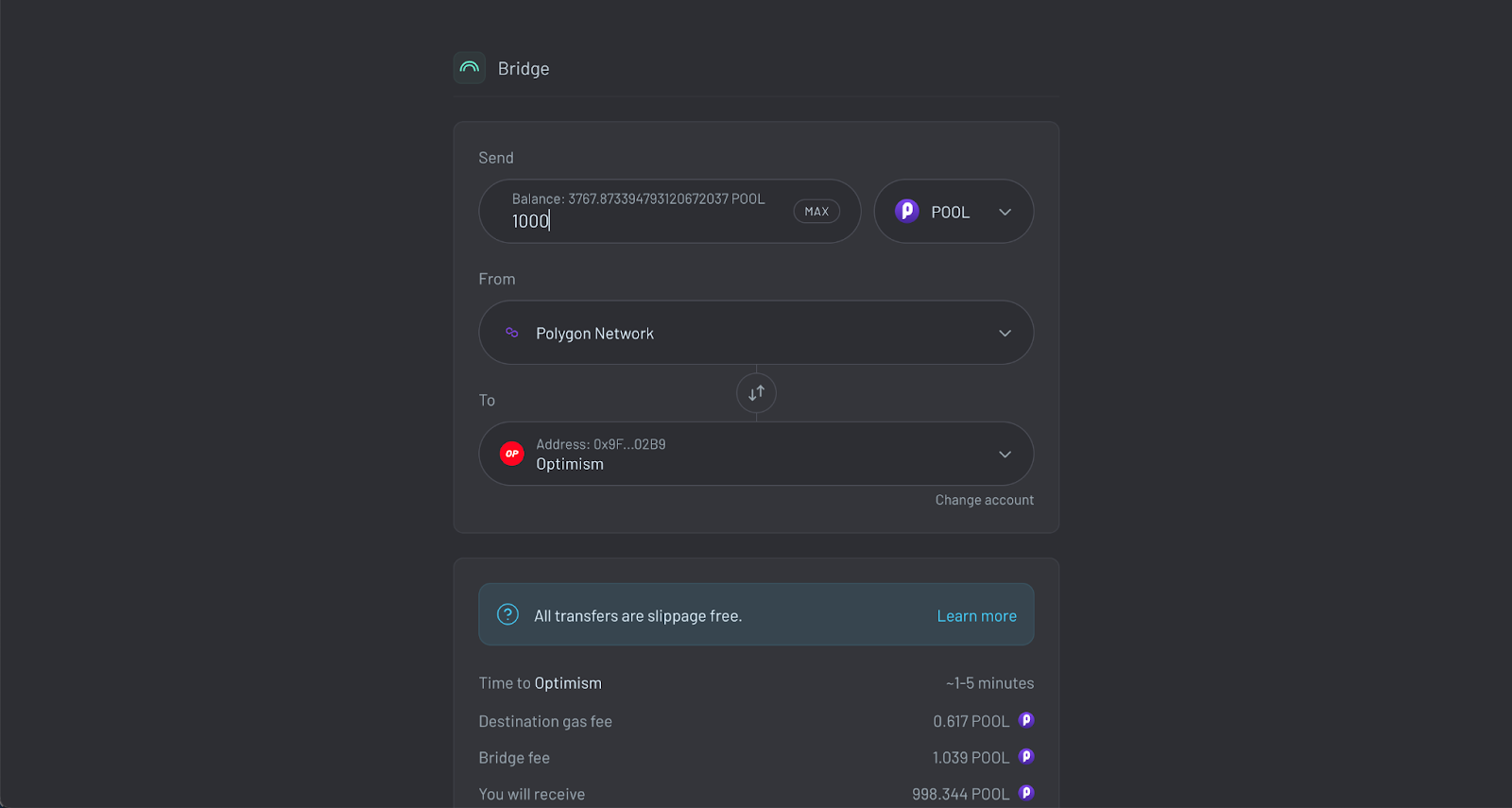
### **Step 1: Enter bridge details**

Head to [across.to/bridge](https://across.to/bridge) and connect your wallet on the top right corner. Enter the bridge details accordingly.&#x20;

The different fields explained:

* **Send**: Select the POOL token and enter the amount of tokens you want to transfer
* **From**: Select the chain you want to send your tokens from
* **To**: Select the destination chain

<figure><img src="https://lh5.googleusercontent.com/AxRoQyUxnI5kKoJ-xayeDw30O7GQ9kuLe7Ed3vlwdWedb8dOYihKlFQwPndAYBWqbnx8TJPenZhVY-BRTCfven6uRysAW7f3hJx-L5f63hsT58UwXsLUgwoMKB_2Yg6_eR0IqCXuYRXdKJAKG2VLU6w" alt=""><figcaption><p>Enter bridge details</p></figcaption></figure>

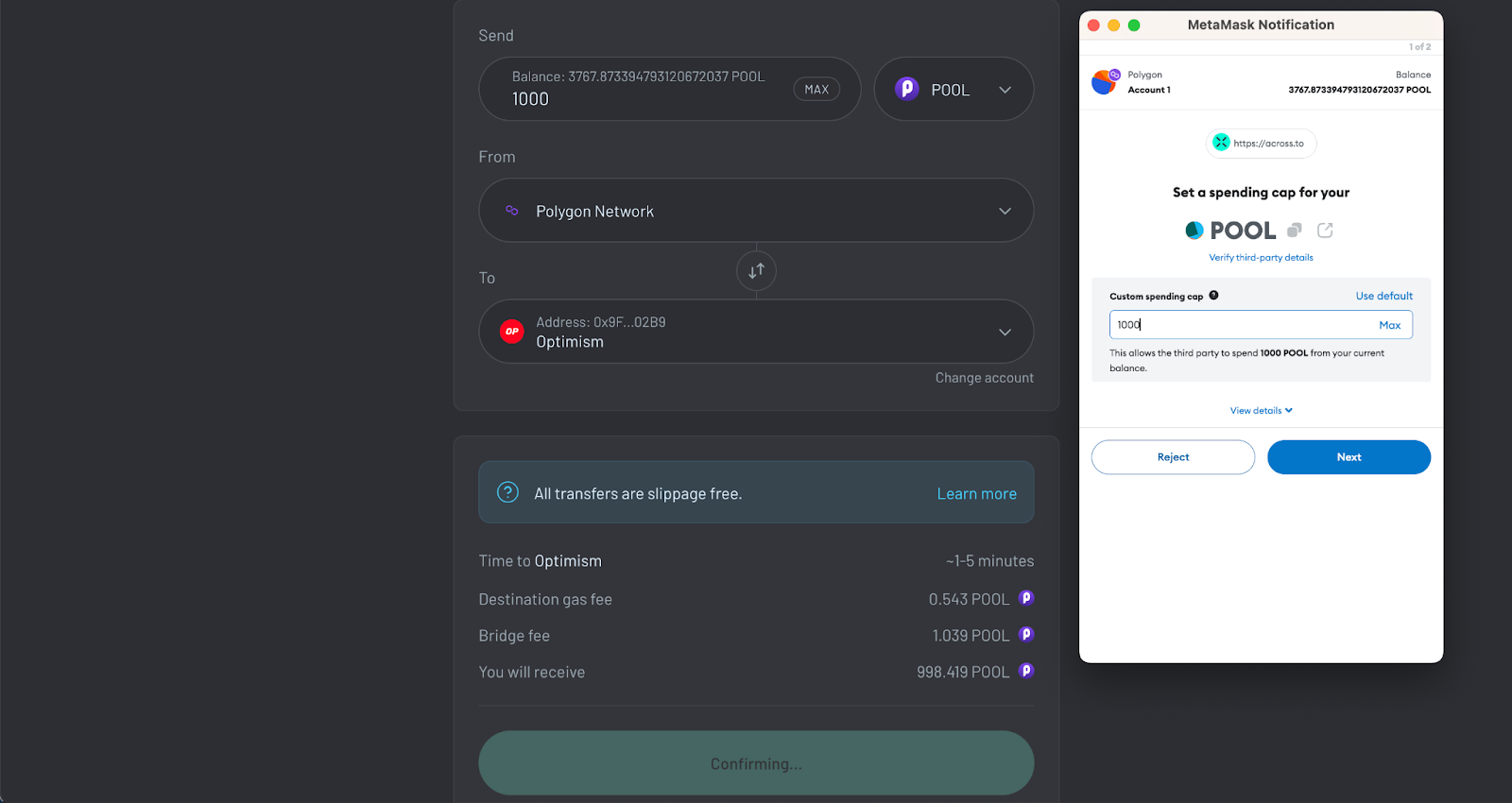
### **Step 2: Approve the contract**

Before bridging you need to allow the smart contract to access your POOL tokens. Click the approve button and verify the transaction in your wallet.

<figure><img src="https://lh4.googleusercontent.com/LGYO9hRLXF101YlpJiAJVVal_JY7jC6lPWlZcgTp-nacV7oqQ5CkA5rpVbBvXIAALrxUME5-tGBCgJ9F9Eh8xYI9EBxdpVv_bYSB-q4LMq3WyVBAf55GifMMgHFfEdrCuxSU5sureQUO5KXTtYOs-tc" alt=""><figcaption><p>Approve the contract</p></figcaption></figure>

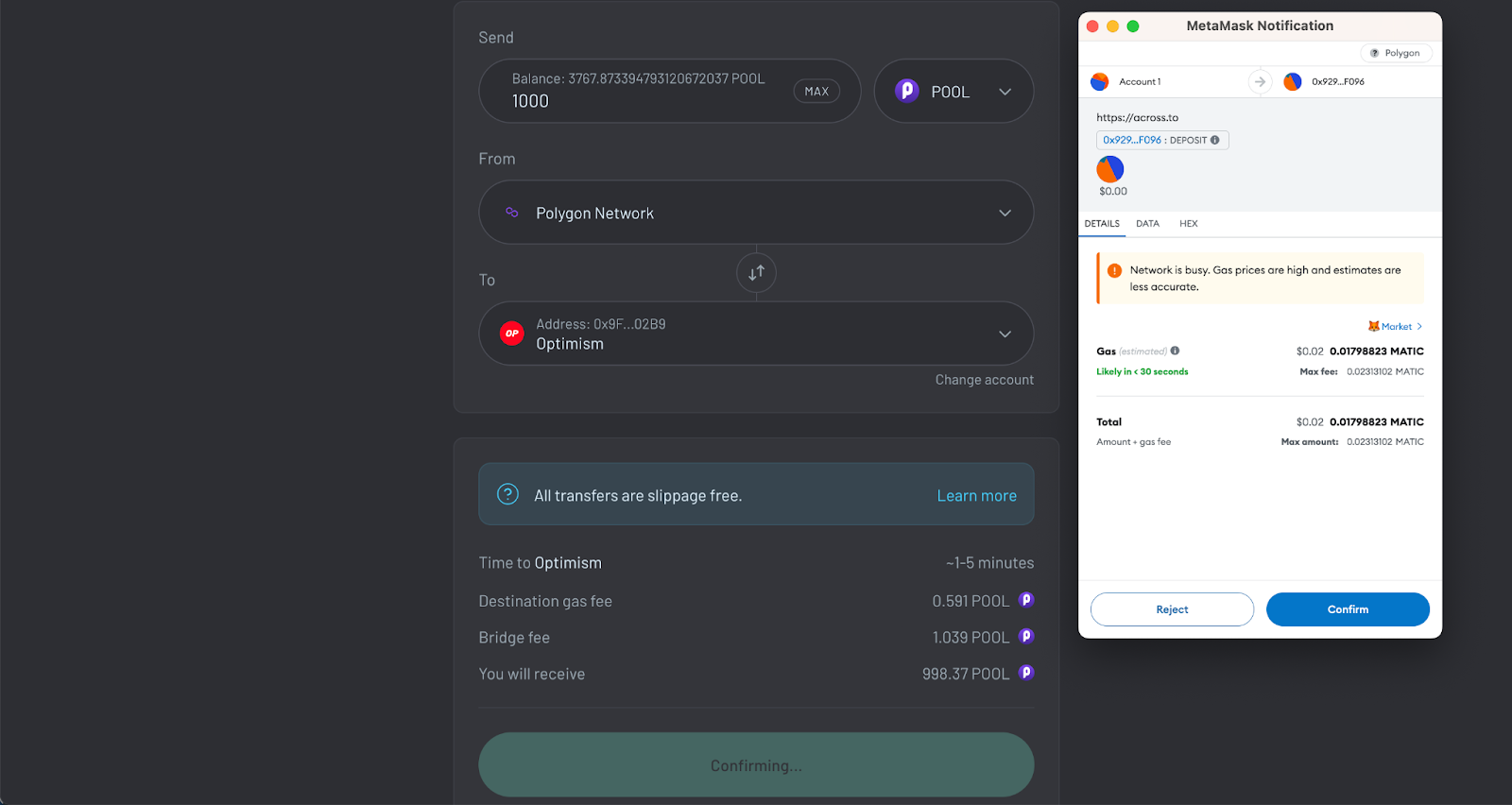
### **Step 3: Confirm the transaction**

This step will send your tokens to the bridge’s smart contract. After verifying that all data you entered is correct (amount, tokens, source-, and destination chain) you can click the send button. Confirm the transaction in your wallet and your assets are on the way!

<figure><img src="https://lh6.googleusercontent.com/KwSAkiJbFBrQoHOu88lvQnxVp_-ZmMMtDOoqjjGFQTwn3u--LUrPLNEPypJBtrQzraxw2RksD0f_cjzaCDFMNgBEqfCX8tXACRdtRxFYv3o3xvWWJqtHnVCitBYorMwdVRCLSPb-kpghD11QLvsAxAQ" alt=""><figcaption><p>Confirm the transaction</p></figcaption></figure>

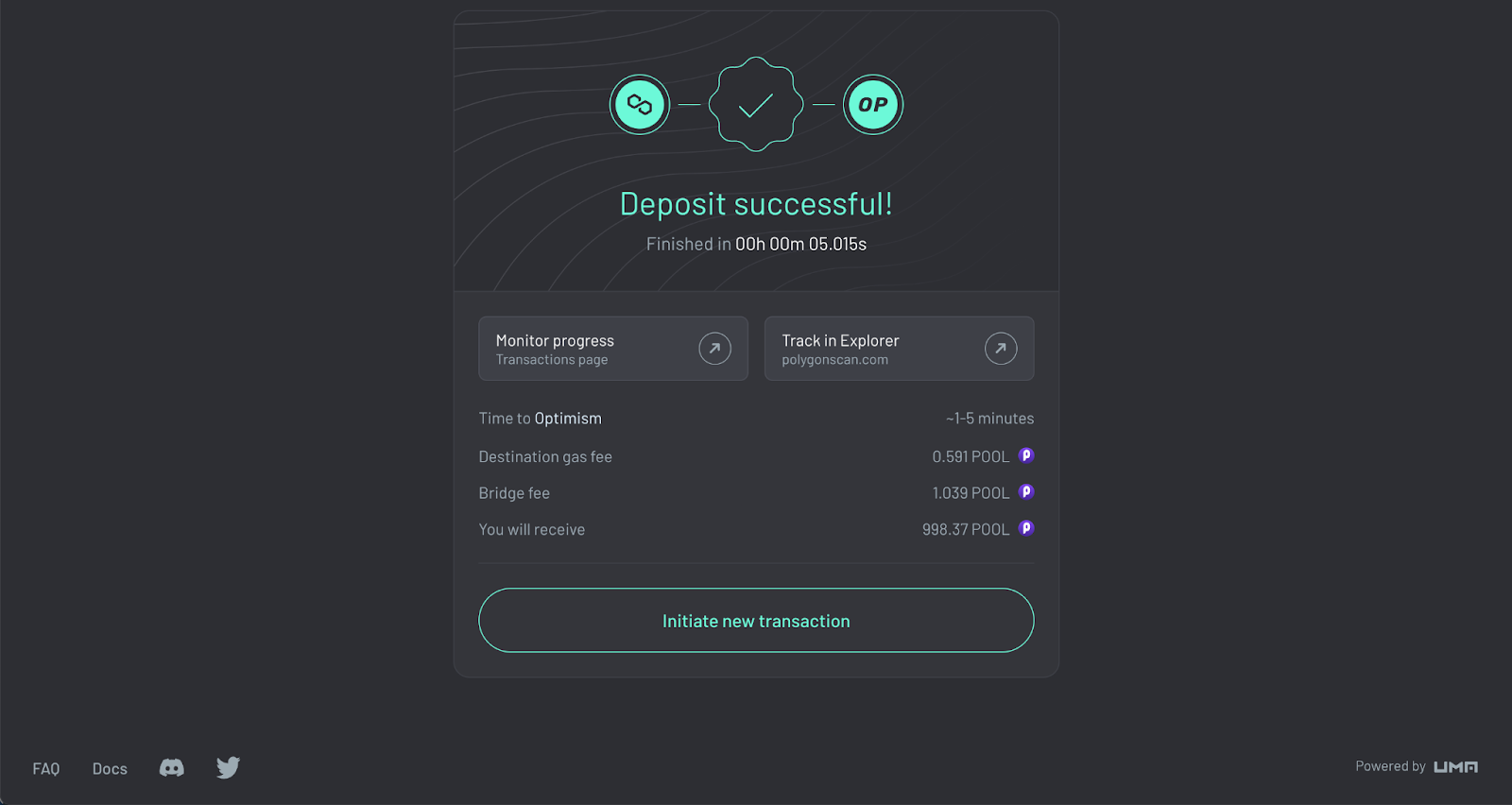
### **Step 4: Wait for the receipt**

After the transaction has been confirmed in your wallet your POOL tokens should arrive on the destination chain shortly.&#x20;

You can review the details of the transaction on the confirmation page and monitor its progress on the [transaction page](https://across.to/transactions).&#x20;

<figure><img src="https://lh6.googleusercontent.com/eTiRSM9CD4BuZRLQuMA3_ye59wi8U2gsdMwMBIoxluLTvGq0M2n4WreOniwrK1JdtQT-CBOiceVW9eXXLHsBOt4s_geOnoybKTJ1OlluKdrkIXq0aHVu7_AwCTAG_jVzPDPyjXlEFNxvpWDXnFDzM_E" alt=""><figcaption><p>Wait for the receipt</p></figcaption></figure>

## **Fees**

In addition to the transaction fee for sending your tokens to the bridge the Across protocol charges two fees:

<details>

<summary><strong>Destination Gas Fee</strong></summary>

To deliver the tokens to the user on the destination chain, the Across protocol submits a transaction on behalf of the user. The destination gas fee covers the gas costs associated with this transaction on the destination chain.

</details>

<details>

<summary>Bridge Fee</summary>

In order to send their tokens instantly across networks, users pay a small [bridge fee](https://docs.across.to/how-across-works/fees) to incentivize relayers and liquidity providers.&#x20;

Relayers give out short-term token loans to Users in exchange for fees. This is to incentivize them to promptly relay a transaction. Relayers fulfil deposit requests by sending the depositor their desired token on their requested destination chain.&#x20;

Liquidity Providers provide the capital that enables relayers to have flexibility about where they want to take a refund in exchange for fees. Their capital is also available to fulfil deposits in the case that no relayers can fast-fill a deposit.

As a user, you don’t have to care about all of that! Because of this incentive design, you’re able to quickly bridge your tokens while the relayers take on the risk for you.&#x20;

</details>

## Additional Resources

* [How Across works](https://docs.across.to/how-across-works/overview)
* Learn more about Fees in the [Across Documentation](https://docs.across.to/how-across-works/fees)
* Learn more about Bridges & Bridge Risk in the [Ethereum documentation](https://ethereum.org/en/developers/docs/bridges/)


# Getting involved

## Contributing to PoolTogether

The PoolTogether protocol is not controlled by any company or centralized group. The protocol is open source free software that is deployed on blockchains and managed and controlled by the POOL token holders. If you want to help improve PoolTogether and its ecosystem there are some ways to help out below.

### New to PoolTogether?

Before contributing, make sure you're familiar with:

* the [vision & values of PoolTogether](https://docs.pooltogether.com/pooltogether/governance/protocol-constitution)
* the works of [protocol governance](https://docs.pooltogether.com/pooltogether/governance)
* PoolTogether’s [Brand Kit](https://www.figma.com/community/file/1212805243917604494)

You don't need permission to work on anything, but it's always best to let others know what you're planning to do. The best place for that is the [PoolTogether Discord server](https://pooltogether.com/discord).

### First steps

* Use [POOL](/pooltogether/pool-token)
* Make a [deposit](https://app.pooltogether.com)
* Follow on [Twitter](https://twitter.com/PoolTogether_)
* Join a [Community Call](https://pooltogetherdao.notion.site/Community-Calendar-4ce3024241dd464db96215e6729a78e0)
* Share with your friends

### **Ways to contribute**

* [Participate in protocol governance](https://docs.pooltogether.com/pooltogether/governance) — Decentralized governance needs healthy participation
* [Improve the user documentation](https://docs.pooltogether.com/) — Make PoolTogether easier to use by improving or adding to the user docs
* [Provide feedback](https://discord.com/channels/629836507280048129/908437482964668436) — Use the #feedback channel on Discord and help improve PoolTogether
* [Help others](https://discord.com/channels/629836507280048129/711951593343418439) — Be a helping hand in the community's #help channel on Discord
* [Create or improve content](https://discord.com/channels/629836507280048129/945969747181314088) — Create new articles, make tweaks to what's here or suggest something new
* [Request a feature](https://pooltogether.canny.io/) — Let us know about any ideas you have for a new feature or design
* [Work on bounties](https://app.dework.xyz/pooltogether/pool-bounties) — Work the community has identified that needs doing
* [Add extensions](https://tools.pooltogether.com) — Add a dapp or tool to the ecosystem page
* [Create an interface](https://dev.pooltogether.com/protocol/next/introduction) — Build new interfaces and ways to use the protocol
* [Report vulnerabilities](https://docs.pooltogether.com/security/bug-bounties) — Secure the protocol and disclose vulnerabilities through the Security Bounties Program
* [Be creative](https://pooltogether.com/discord) — Join the community on Discord and share your ideas

Any questions? Reach out in [`#contribute`](https://discord.com/channels/629836507280048129/862701391151890453)!

If you are looking for some more guidance to get involved in the community, check out [this guide](https://pooltogetherdao.notion.site/Getting-Involved-4e768e95ccde4e0198e7fa18bbf8b37d).

### Receiving funding

Do you need funding to achieve your goals for growing PoolTogether? Here are some options:

* [Apply](https://poolgrants.org/) for a Grant — The grants committee supports value aligned projects growing or building on PoolTogether
* [Submit](https://gov.pooltogether.com/c/team-budget-requests/13) a PT Budget Request — The PTBR process helps coordinate funding for teams, developers, and anyone else who wishes to contribute to the PoolTogether protocol
* [Join](https://www.notion.so/New-Coordinape-Member-84c6d94e071b4367b56cb82b12430420) the Coordinape Circle — Provide value and get rewarded for day to day contributions through Coordinape


# Governance

Control of the PoolTogether Protocol rests solely in the hands of the community holding the POOL tokens.

### PoolTogether Governance

POOL is the governance token of the PoolTogether community. Every POOL token represents a vote in governance.

The primary duty of POOL holder governance is to ensure the growth of the protocol. This includes:

* Protocol parameters like frequency of prizes
* Distributions from the [protocol treasury](https://info.pooltogether.com)
* Ratifying protocol upgrades
* Requests for budgets

Any changes to these parameters have to undergo the PoolTogether governance process and are voted on by POOL token holders.

### **Governance Toolkit**

The major tools for PoolTogether governance are as follows:

* [**Governance Forum**](https://gov.pooltogether.com): The main space for discussion and ideation about changes to the protocol and governance proposals.
* [**Governance Dashboard**](https://tally.xyz/gov/pooltogether): Vote with POOL tokens held in your wallet or delegated to you.
* [**Snapshot**](https://snapshot.org/#/pooltogether.eth): A platform for off-chain governance.
* [**Discord**](https://pooltogether.com/discord): For informal governance discussion and feedback.

### Governance Contracts

PoolTogether governance is based on an OpenZeppelin variant of Governor Bravo, with ScopeLift’s Flexible Voting extension. The Governor contract is deployed [here](https://etherscan.io/address/0x8a907De47E00830a2b742db65e938a3ea1070A2E).

Previously, PoolTogether governance was using a fork of Compound's Governor Alpha smart contracts. The Upgrade to Governor Bravo was voted on in [PTIP-88](https://www.tally.xyz/gov/pooltogether-old/proposal/79). You can browse all past proposals [on Tally](https://www.tally.xyz/gov/pooltogether-old/proposals).

### Learn more

<table data-column-title-hidden data-view="cards"><thead><tr><th></th><th></th><th></th><th data-hidden data-card-target data-type="content-ref"></th></tr></thead><tbody><tr><td>Proposal Process</td><td></td><td></td><td><a href="/pages/zSB7lAha5iF6qjVaBPB9">/pages/zSB7lAha5iF6qjVaBPB9</a></td></tr><tr><td>Voting &#x26; Delegation 101</td><td></td><td></td><td><a href="/pages/o3oo9VVMgHZu4a4e1ZQL">/pages/o3oo9VVMgHZu4a4e1ZQL</a></td></tr><tr><td>Governance Roles</td><td></td><td></td><td><a href="/pages/DNLYI5t78nxETixYsz5O">/pages/DNLYI5t78nxETixYsz5O</a></td></tr><tr><td>Protocol Constitution</td><td></td><td></td><td><a href="/pages/nr4wt449W7q3bC6jsYax">/pages/nr4wt449W7q3bC6jsYax</a></td></tr><tr><td>Governance Calendar </td><td></td><td></td><td><a href="/pages/N7shNoqT64DKVifoiXUW">/pages/N7shNoqT64DKVifoiXUW</a></td></tr><tr><td>Governance Forum</td><td></td><td></td><td><a href="https://gov.pooltogether.com">https://gov.pooltogether.com</a></td></tr></tbody></table>


# Proposal Process

## Overview

The community of POOL holders makes decisions through governance proposals. Proposals are accepted or rejected using an onchain voting process. Anyone, who holds or has delegated >10,000 POOL, can submit a proposal to PoolTogether governance.

All proposals should be submitted as one of the valid [proposal types](#proposal-types) stated below and follow the outlined proposal process:

1. [Request for Comments \[RFC\]](#1.-forum-post)
2. [PTIP / PTBR](#2.-community-feedback)
3. [Onchain Proposal](#4.-on-chain-proposal)
   * [Voting](#voting)
   * [Implementation](#implementation)
   * [Defeated Proposals](#what-if-a-proposal-is-defeated)

### Recommended timeline

The following timeline is recommended and should be considered when creating a proposal.

* RFC: 5 days (*minimum*)
* PTIP/PTBR: 24 hours (*minimum*)
* Submit onchain: 5 days (*does not vary*)

*Note: This timeline can vary based on community approval.*

### 1. Request for Comments \[RFC]

All major discussions should start on the governance forum to be reviewed by anyone in the PoolTogether community.&#x20;

* Submitted as a new [forum discussion](https://gov.pooltogether.com/) in the appropriate category.
  * New topics auto-populate with the corresponding proposal template
* Marked as Request for Comments by adding `[RFC]` to the title.
* Follow the forum title format as stated for the [proposal type](notion://www.notion.so/o/-M58QKDDuY724c-sqMF4/s/-MjVmQloS14HsmiACMUz-887967055/~/changes/131/pooltogether/governance/proposal-process#proposal-types).

Once submitted, the forum discussion should be open for feedback from the community for at least **5 days** (assuming it is well-formed).

* If the proposal does not get explicit approval or is still highly contested, the proposer should -continue to seek feedback from the community and submit an amended proposal.
* If the proposal has strong support, the proposer can create a corresponding PTIP/TBR.

### 2. PTIP / PTBR

After applying potential community feedback to the proposal, the proposer should:

* create a new [forum discussion](https://gov.pooltogether.com/) in the appropriate category
* flag the RFC-thread to be locked
* state the changes made to the initial RFC in the finished proposal

and leave the topic open for at least **24 hours**, before submitting the proposal onchain.

### 3. Onchain Proposal

When it comes time to create an onchain proposal, the proposer must:

1. Create a new [onchain proposal](https://vote.pooltogether.com/), matching the specification outlined in the forum post
2. Update the forum post with links to the onchain proposal and snapshot vote

The details of the PoolTogether Governance system are described [here](/pooltogether/governance/voting-and-delegation-101).

### Voting

After a proposal is submitted onchain a **5-day voting period** begins. A proposal succeeds, if after five days

* the majority of votes are in favor (approval threshold of 51%)
* **AND** at least 100,000 votes have been cast in favor (Quorum of 1%).

### Implementation

When a proposal succeeds, the proposer (or any other person) can queue Proposal.

There is a two day timelock before the proposal is actually implemented. After the timelock has expired, the proposal can be executed.

<details>

<summary>What if a proposal is defeated?</summary>

In case a proposal does not pass a governance vote, the proposal will not be executed. If the proposer wishes to iterate on a proposal that has been rejected, they should:

1. Create a new proposal thread on the Forum.
2. Include a link to the first proposal that did not pass.
3. Clearly identify what has changed in the new proposal.

</details>

### Footnotes

* If a proposer does not hold their votes throughout the full time of the onchain proposal, then the proposal can be canceled by anyone.
* Urgent, security-related PTIPs may progress to an onchain proposal immediately.

## Proposal Types

<table><thead><tr><th width="340">Proposal Type </th><th width="188">Forum Title Format</th><th width="231">Description</th><th width="193">Quorum</th><th width="189">Approval Threshold</th><th data-hidden></th></tr></thead><tbody><tr><td><strong>PTIP</strong> <br>PoolTogether Improvement Proposal</td><td>PTIP-&#x3C;Id>: <br><em>eg. PTIP-89:</em></td><td>Process for changing the protocol </td><td>1% (100,000 POOL)</td><td>51%</td><td></td></tr><tr><td><strong>PTBR</strong> <br><a href="/pages/ofa2lQTf03olffBHpYYg">PoolTogether Budget Request</a></td><td>PTBR-X: Project/Team Name</td><td>Process for coordinating treasury funds</td><td>1% (100,000 POOL)</td><td>51%</td><td></td></tr></tbody></table>

## **Acknowledgements**

The PTIP process is a modified version of [Badger Improvement Proposals](https://forum.badger.finance/t/about-the-bip-badger-improvement-proposals-category/20) and [Yearn Improvement Proposals](https://github.com/yearn/YIPS/blob/master/yip-X.md).


# PT Budget Requests

The PTBR process helps coordinate funding for anyone who wishes to contribute to the PoolTogether protocol.

## Overview

The PoolTogether Budget Request process helps coordinate funding for teams, developers, and anyone else who wishes to contribute to the PoolTogether protocol.

It's a culture in the sense that this process is mostly social conventions: about establishing a common set of expectations and holding each other accountable.

Contributors funded through PTBRs are collectively called the "[Council](/pooltogether/governance/governance-roles#council)". It's a dynamic group of people that consists of the actively compensated contributors. The Council meets weekly to coordinate. If you wish to listen in on any of these calls, it's open to anyone. Just ask for the `@Council Auditor` role on Discord.

If you want to contribute to PoolTogether and need funding, then this process is for you.

#### **Quick links:**

* [Discord #contribute channel](https://discord.com/channels/629836507280048129/862701391151890453)
* [Onchain Proposals with Tally](https://www.tally.xyz/gov/pooltogether)
* [Treasury Funds](https://info.pooltogether.com/treasury)

## How it Works

The Budget Request process flows like so:

1. [Pitch your idea to the community](#pitch-your-idea)
2. [Fill out the PTBR template](#make-the-budget-request)
3. [Get funded](#get-funded)
4. [Join the Council and coordinate with other contributors!](#join-the-council)

### Pitch Your Idea

Start getting feedback and building consensus early! Make sure you can articulate:

* The value that your contribution will bring to the protocol. What is the key benefit?
* The contribution timeframe. Is this a one-time request? Is this recurring? How long will this contribution be for?
* The budget. What do you expect this contribution to cost?

There are lots of ways of getting feedback about your idea:

* Reach out to other contributors in our [Discord #contribute channel](https://discord.com/channels/629836507280048129/862701391151890453)
* Post your idea in the [gov forum](https://gov.pooltogether.com)
* Join one of the weekly Council calls to pitch your idea.

### Make the Budget Request

Once you've gotten a rough consensus around the pitch, create a new [PoolTogether Budget Request](https://gov.pooltogether.com/c/budget-requests) topic on the governance forum. The template provides a structure and makes it easy to submit all the details that the community will need to know when evaluating your request.

New Budget Requests should be prefixed with `[RFC]` so that the community knows that the request is evolving and to encourage engagement.

At this point, reach out to the `@Council` so that the budget request can be highlighted on the weekly Community Call. This call occurs every Thursday on Discord at 11:45 am PT.

### Get Funded

Once the Budget Request has received enough feedback and all changes are complete, its time to apply for funding:

1. Lock the RFC thread
2. Create a new PTBR post with the final RFC content
3. Create a corresponding onchain proposal

If the request is small enough, the Pool Grants team may step up to fulfill the request. Otherwise, you'll need to submit a onchain proposal.

**Synchronized Proposals**

We encourage applicants to coordinate with the Council to synchronize their Budget Requests. This helps with voter engagement significantly: proposals receive much more attention when there is more than one.

Applicants for recurring budgets typically make requests in quarterly increments, and submit the proposals in the month leading up to the quarter.

One-time requests can be much more flexible, but we encourage all applicants to coordinate through the Council.

See the [Governance Calendar](https://docs.pooltogether.com/pooltogether/governance/governance-calendar) for when votes are scheduled.

**Proposal Content**

We recommend using [Tally](https://www.tally.xyz/gov/pooltogether) to create the onchain proposal.

The proposal should have:

* The same name as the PTBR forum topic
* The same content as the forum topic
* Actions that draw funds from the protocol treasury.

See the available funds using the [Treasury Tool](https://info.pooltogether.com/treasury).

### Join the Council

Once approved, the applicant or anyone from their team can join the Council. Generally the membership is for the duration of the budget.

To receive the Discord `@Council` tag, just request it from the community lead.

The Council meets weekly to give status updates and have general discussion. Meetings are held every Tuesday at 11:00am PT on Discord. Once you have the `@Council` role you'll see the channels.

See the [Governance Calendar](https://docs.pooltogether.com/pooltogether/governance/governance-calendar) to see when Council calls are held.

Anyone can listen in on Council calls by requesting the `@Council Auditor` role.

## Summary

So if you have an idea to improve PoolTogether, please come into [Discord](https://pooltogether.com/discord) and chat!

If you want to contribute to an existing team, you might be able to find a place with an existing applicant.


# Voting & Delegation 101

A healthy governance system is good for PoolTogether, its users, and the POOL token holders. You can help by putting your voting power to use.

## What can I do with POOL?

The POOL token governs the PoolTogether protocol. POOL token holders can:

1. [Vote on proposals](#voting)
2. [Delegate their voting power](#delegation)
3. [Create governance proposals](#proposals)

### What’s right for me?

Active governance participation includes doing research, providing helpful feedback, coordinating with other governance participants, and a certain time commitment to make educated decisions. Therefor you get to play an active role in growing the PoolTogether protocol.

Anyone can participate in decentralized governance. If you have questions or need help please don’t hesitate to [ask the community on Discord](https://pooltogether.com/discord).

## Voting

PoolTogether governance exists on the Ethereum blockchain. Anyone, either holding POOL or being delegated POOL on Ethereum, can vote.

{% hint style="info" %}
Voting power is determined based on the number of tokens delegated to each address. This means users *must* submit a delegation transaction before their tokens will be included in governance votes. Users may either delegate to a third party, or self-delegate if they would like to participate in voting directly.
{% endhint %}

### How do I vote?

Voting happens onchain. To cast your vote you can use the [PoolTogether interface](https://vote.pooltogether.com/) or any other alternative governance interface. The outcome is the same, the only difference is the interface.

{% hint style="info" %}
Note: Onchain voting requires Ethereum transaction fees.
{% endhint %}

### What about POOL on other networks?

POOL tokens on the Optimism or Polygon are not included in protocol governance. However, they can participate in offchain governance, like signalling. All offchain voting happens on the [PoolTogether.eth Snapshot](https://snapshot.org/#/pooltogether.eth/).

### How do I know when new proposals are up?

All active proposals are

* previously discussed on the [PoolTogether governance forum](https://gov.pooltogether.com)
* announced on [Discord](https://pooltogether.com/discord)
* displayed in the [PoolTogether app](https://app.pooltogether.com)

## Delegation

You can delegate the voting weight of your POOL tokens to someone else to make governance decisions on your behalf. You still retain full ownership of your tokens, but your delegate will be able to vote.

### What are governance delegates?

Delegates are community members who volunteer to play an active role in PoolTogether protocol governance. *Everyone* can volunteer to be a governance delegate. Nonetheless, you don’t have to be a governance delegate to be able to vote on proposals.

You can see all Delegate Proposals [in this thread](https://gov.pooltogether.com/t/delegate-proposals-mega-thread/2337). Please feel encouraged to post your own.

### How do I delegate?

You can delegate the voting weight of your POOL tokens via [Sybil](https://sybil.org/#/delegates/pool) or [Tally](https://www.tally.xyz/gov/pooltogether) (both tools have the same outcome).

If you don’t want to delegate your POOL tokens anymore, you can take your delegation back anytime by delegating to yourself.

## Proposals

### Who can create proposals?

Creating a proposal requires 10,000 POOL (0.1% of the total supply). Anyone who either

* holds 10,000 POOL tokens
* has 10,000 POOL tokens delegated to them
* ***or,*** has 10,000 POOL combined from both

can submit a governance proposal.

All proposals must be submitted on the governance forum following the proposal process and must be clear, concise, and unambiguous. Organizing the proposals in this way makes it easy to track and discuss changes to PoolTogether.

### **When does a proposal pass?**

Once submitted, governance proposals are voted on for five days. A proposal will pass if, after five days

* the majority of votes are in favor
* **AND** at least 100,000 votes have been cast in favor

There is a two day timelock before the proposal is actually implemented.

<figure><img src="/files/BrPtCo93aeqfpRTsE4Zx" alt=""><figcaption></figcaption></figure>

Learn more about the proposal process [here](/pooltogether/governance/proposal-process).

## Useful Links:

* Governance Forum: <https://gov.pooltogether.com/>
* PoolTogether Governance Interface: <https://vote.pooltogether.com/>
* Alternative Governance Interfaces: [Sybil](https://sybil.org/#/delegates/pool)⎟[Tally](https://www.tally.xyz/governance/eip155:1:0xB3a87172F555ae2a2AB79Be60B336D2F7D0187f0)⎟[Boardroom](https://boardroom.io/pooltogether/overview)
* Protocol Treasury: <https://info.pooltogether.com/>


# Governance Roles

The different roles in PoolTogether governance are defined as follows:

* [Token Holders](#token-holders)
* [Governance Delegates](#governance-delegates)
* [Contributors](#contributors)
* [Teams](#teams)
* [Council](#council)

<details>

<summary>Token Holders</summary>

POOL token holders govern the PoolTogether protocol. They have the ability to vote on governance proposals or delegate their votes.

PoolTogether governance exists on the Ethereum blockchain and is not limited to the [Pooltogether.com](https://vote.pooltogether.com) interface. There are many different interfaces you can use to view governance proposals and vote.

</details>

<details>

<summary>Governance Delegates</summary>

Delegates are community members who volunteer to play an active role in PoolTogether protocol governance. *Everyone* can volunteer to be a governance delegate. Nonetheless, you don’t have to be a governance delegate to be able to vote on proposals.

You can read through the Delegate Proposals [in this thread](https://gov.pooltogether.com/t/delegate-proposals-mega-thread/2337). Please feel encouraged to post your own delegate proposal.

</details>

<details>

<summary>Contributors</summary>

A contributor is anyone who provides value to the PoolTogether protocol and its community. Anyone can contribute to the PoolTogether protocol without asking for permission. It needs no token or say in governance to contribute.

Learn more about [getting involved](/pooltogether/guides/getting-involved).

</details>

<details>

<summary>Teams</summary>

Teams are the base organizational unit of the PoolTogether community. A Team is a group of contributors working towards a common purpose promoting growth of the PoolTogether protocol. Teams are ratified through the PT Budget Process in a quarterly cadence (see governance calendar).

Learn more about the [PTBR process](https://gov.pooltogether.com/t/about-the-team-budget-requests-category/2572).

</details>

<details>

<summary>Council</summary>

The Council is a support group for Teams, and is made up of team members. The Council serves a number of roles:

* Meets weekly to share status updates.
* Monthly Team performance check-in
* Suggests new guidelines or standards (quarterly or as needed)
* Help onboard new teams, contributors, and facilities existing teams (quarterly or as needed)

The Council gives Teams an opportunity to communicate, share, coordinate and speak with a common voice. You can reach out to the council [on Discord in #governance](https://pooltogether.com/discord).

</details>


# Protocol Constitution

The constitution is a living but hard-to-change document that puts PoolTogether’s ethos into writing.

The PoolTogether protocol constitution is a document that breaks out the vision and other foundational principles of the protocol. It serves as the highest level north star guiding governance and strategy as the protocol and community grow.

The constitution is ratified by POOL holders, with any future changes ratified in the same way.

## Mission

PoolTogether helps people build wealth in a fun and engaging way.

## Vision <a href="#vision-2" id="vision-2"></a>

PoolTogether will be the global infrastructure for prize savings.

## Protocol Core Values

#### Wealth Creating <a href="#wealth-creating-4" id="wealth-creating-4"></a>

PoolTogether is a prize savings protocol helping people build wealth. It does this by making saving money fun, accessible, and financially rewarding. The protocol is **no loss** and positive-sum, leaving everyone better off for using it.

#### Accessible to All <a href="#accessible-to-all-5" id="accessible-to-all-5"></a>

PoolTogether aims to help everyone, regardless of background, technical experience, or current wealth. We aim to make financial security globally accessible and help people build wealth around the world.

#### Secure <a href="#secure-6" id="secure-6"></a>

Savings is a serious business. The protocol design optimizes for security of deposited funds. Perfect security can never be guaranteed, but ensuring the “No Loss” mantra remains true is paramount.

#### User Owned <a href="#user-owned-7" id="user-owned-7"></a>

The protocol is governed by the POOL token, which has been freely distributed to users of the protocol. These token holders make up the heart of the community, guiding and contributing to the mission of the protocol. POOL holders are tasked with stewarding the protocol and making decisions for the long-term benefit of the protocol and its users.

#### Autonomous <a href="#autonomous-8" id="autonomous-8"></a>

The PoolTogether protocol is designed to live forever. It follows the ethos of decentralized finance (DeFi), seeking to improve the financial system by replacing humans with immutable software. User funds will never be accessible to PoolTogether developers or POOL token holders.

#### Transparent and Fair <a href="#transparent-and-fair-9" id="transparent-and-fair-9"></a>

The PoolTogether protocol is a set of smart contracts. The code is publicly available and open source for everyone to verify, validate, or adopt. It can be copied and re-used by anyone. It is globally accessible, provably fair, and free to use for anyone without permission.

#### Fun and Engaging <a href="#fun-and-engaging-10" id="fun-and-engaging-10"></a>

We’re here to have a good time building wealth. Our protocol brings people joy and excitement!

### Signal your pledge to the PoolTogether Protocol Constitution

Signing [this Snapshot](https://snapshot.org/#/pooltogether.eth/proposal/0x1934365725b98f908ae1de42a637c618301d2fd0167eac455478fb74bf3f101b) will signal your pledge to the constitution.


# Governance Calendar

The PoolTogether Governance calendar covers relevant events, meetings and reminders. You can subscribe to the calendar by using the button in the bottom right.

All times are shown in Coordinated Universal Time (UTC).&#x20;

{% embed url="<https://calendar.google.com/calendar/embed?src=1a22b7cfe4963445d9d075b256f3b5a2216e1b4ec838a5c719f5d7d8362e575a%40group.calendar.google.com&ctz=Europe%2FBrussels>" %}


# POOL Token

The **POOL** token controls the PoolTogether protocol to ensure decentralization and community ownership. Token holders manage protocol parameters to promote growth. Read about [tokenomics](/pooltogether/pool-token/tokenomics-and-governance) and [governance](/pooltogether/governance).&#x20;

### Contract

<table><thead><tr><th width="150">Ticker</th><th>Chain</th><th width="450.2">Contract Address</th></tr></thead><tbody><tr><td>$POOL</td><td>Ethereum</td><td><code>0x0cec1a9154ff802e7934fc916ed7ca50bde6844e</code></td></tr><tr><td>$POOL</td><td>Polygon</td><td><code>0x25788a1a171ec66Da6502f9975a15B609fF54CF6</code></td></tr><tr><td>$POOL</td><td>Optimism</td><td><code>0x395Ae52bB17aef68C2888d941736A71dC6d4e125</code></td></tr></tbody></table>

#### POOL on

* [Coingecko](https://www.coingecko.com/en/coins/pooltogether)
* [Zapper](https://zapper.fi/token/ethereum/0x0cec1a9154ff802e7934fc916ed7ca50bde6844e/POOL/details?)


# Tokenomics

## Growth Flywheel&#x20;

The key to PoolTogether's growth and long term sustainability is large prizes. Large prizes attract more deposits which create bigger prizes attracting more deposits. This is the growth flywheel for PoolTogether.

![](/files/-MlGu9uA6t4sRVg39siC)

The PoolTogether protocol will reach escape velocity when&#x20;

1\) Prizes are large enough to organically attract new depositors and&#x20;

2\) depositor consistently win enough small prizes to remain engaged and economically better off than a traditional savings account.&#x20;

However, the protocol has a "cold start" problem. Large prizes are needed to get deposits but to get deposits we first must have large prizes. Two mechanisms help overcome this, reserve capture and POOL token distribution.&#x20;

## The POOL Token & Kickstarting the Growth Flywheel&#x20;

The POOL token solves the cold start problem. At the early stages, the distribution of the POOL token serves as an additional incentive to deposit into the protocol when prizes are not yet large enough to achieve escape velocity. People initially deposit primarily to receive the POOL token but these deposits create larger prizes and grow the reserve. Larger prizes begin to trigger organic growth. As organic growth increases and becomes self-sustaining the distribution of the POOL token can be reduced.&#x20;

## Reserve Capture & Perpetual Growth&#x20;

The "Reserve" is a percent of every prize that is kept in the prize pool and placed under the control of POOL token holders.  Funds directed to the reserve make the prizes larger without diluting the odds of winning. Prizes in turn contribute to a larger reserve. This creates a [perpetual growth cycle](https://medium.com/pooltogether/perpetual-growth-db101a47791) and mathematically speaking, increases the expected value of a deposit into PoolTogether. A large reserve accelerates the growth flywheel.&#x20;

![](/files/-MlBsDUiDTeR2CqDbtUn)

&#x20;[You can view the current protocol reserves here](https://info.pooltogether.com/).&#x20;

## Staking POOL

POOL holders can deposit their POOL tokens to enable voting without transactions fees. [Deposit your POOL tokens here to begin](https://app.pooltogether.com/account).

## Governance and the Growth Flywheel&#x20;

The above is the playbook for how the protocol can create self-sustaining organic growth. It's up to POOL holders to manage the different variables properly to ensure this growth happens.&#x20;


# POOL Supply

This page details the POOL token supply

Details of the POOL token supply and distribution are below.

* The total supply of POOL tokens is 10 million
* 4.8 million (48%) of those tokens have not been distributed and [are controlled by governance](https://info.pooltogether.com/)

5.2 million (52%) have already been distributed; details of the most significant distributions are as follows:&#x20;

* 1.5 million tokens were given to early users of the protocol; of that amount, \~400,000 remained [unclaimed in the distribution contract](https://etherscan.io/address/0xBE1a33519F586A4c8AA37525163Df8d67997016f#tokentxns)
* 1.2 million tokens were given to early contributors to the protocol. All these tokens are subject to one-year locking ending on February 17th, 2022
* 750,000 tokens were given to investors in PoolTogether Inc. All these tokens are subject to one-year locking ending on February 17th, 2022
* 411,000 tokens were distributed to [participants in the protocol diversification](https://gov.pooltogether.com/t/ptip-13-revised-treasury-diversification/1049). These tokens have one year vesting with progressive one-year unlocking that begins in May 2022

This information is subject to change as POOL governance makes new votes. You can read the [original distribution article here](https://medium.com/pooltogether/introducing-pool-23b09f36db48). You can [view the current balances of the POOL treasury here](https://info.pooltogether.com/).&#x20;


# Getting POOL Tokens

A few options for getting POOL tokens are listed below:&#x20;

* [Uniswap](https://app.uniswap.org/#/swap?inputCurrency=eth\&outputCurrency=0x0cec1a9154ff802e7934fc916ed7ca50bde6844e)
* [Sushiswap](https://app.sushi.com/swap)
* [Matcha (aggregates to find the best price) ](https://matcha.xyz/markets/1/0x0cec1a9154ff802e7934fc916ed7ca50bde6844e/0xa0b86991c6218b36c1d19d4a2e9eb0ce3606eb48)
* [Zapper (aggregates to find the best price)](https://zapper.fi/token/polygon/0x25788a1a171ec66da6502f9975a15b609ff54cf6/POOL)
* [Llama Swap  (aggregates to find the best price)](https://swap.defillama.com)

### Bridging POOL

POOL tokens can be bridged using the legacy bridge of each network:

* [Optimism](https://app.optimism.io/bridge/deposit)
* [Polygon](https://wallet.polygon.technology/polygon/bridge/deposit)

Additionally, POOL is supported by Across. Find a guide [here](/pooltogether/guides/bridging-pool-with-across).

### Contract Addresses

<table><thead><tr><th width="150">Ticker</th><th>Chain</th><th width="450.2">Contract Address</th></tr></thead><tbody><tr><td>$POOL</td><td><a href="https://etherscan.io/token/0x0cec1a9154ff802e7934fc916ed7ca50bde6844e">Ethereum</a></td><td><code>0x0cec1a9154ff802e7934fc916ed7ca50bde6844e</code></td></tr><tr><td>$POOL</td><td><a href="https://polygonscan.com/token/0x25788a1a171ec66Da6502f9975a15B609fF54CF6">Polygon</a></td><td><code>0x25788a1a171ec66Da6502f9975a15B609fF54CF6</code></td></tr><tr><td>$POOL</td><td><a href="https://optimistic.etherscan.io/token/0x395ae52bb17aef68c2888d941736a71dc6d4e125">Optimism</a></td><td><code>0x395Ae52bB17aef68C2888d941736A71dC6d4e125</code></td></tr></tbody></table>


# Ecosystem & Links

{% hint style="danger" %}
There is no official PoolTogether Helpdesk or Customer Support.

Never share your Seed or Recovery Phrase with anybody.
{% endhint %}

### Official Links

* Landing Page: [pooltogether.com](https://pooltogether.com/)
* App: [app.pooltogether.com](https://app.pooltogether.com/)
* Tools: [tools.pooltogether.com](https://tools.pooltogether.com)
* Developer Portal: [dev.pooltogether.com](<https://dev.pooltogether.com >)

### Socials & Community

* Discord: [https://pooltogether.com/discord](https://pooltogether.com/discord/)
* Mirror: <https://pooltogether.mirror.xyz>&#x20;
* Medium: <https://medium.com/pooltogether>
* Twitter: <https://twitter.com/PoolTogether_>
* Lens: <https://lenster.xyz/u/pooltogether>
* Reddit: [https://www.reddit.com/r/PoolTogether](https://www.reddit.com/r/PoolTogether/)
* Telegram: <https://t.me/PoolTogetherTelegram>

### Governance

* Governance Forum: [gov.pooltogether.com](https://gov.pooltogether.com/)
* Governance Documentation: [docs.pooltogether.com/pooltogether/governance](https://docs.pooltogether.com/pooltogether/governance)
* Governance Dashboard: [vote.pooltogether.com](https://vote.pooltogether.com)
* Treasury Info: [info.pooltogether.com](https://info.pooltogether.com/)

### Data & Analytics

* Pool Explorer: [https://poolexplorer.win](https://poolexplorer.win/)
* Dune Analytics Team: <https://dune.com/pooltogether>
* V4 Dune Dashboard: <https://dune.xyz/sarfang/PoolTogetherV4>

### Prize Notifications

* [Setting up Prize Notifications](#prize-notifications)


# Developers

Developer Resources for PoolTogether

## PoolTogether V5

The PoolTogether V5 developer portal includes information about the protocol design, its deployments, a variety of guides to interact with V5, and more.&#x20;

Find it here: [https://dev.pooltogether.com](<https://dev.pooltogether.com >)

## PoolTogether V5

The PoolTogether V4 developer portal includes:

* Architecture
* API Reference
* Tutorials

Check it out at <https://dev.pooltogether.com/protocol/V4/introduction>

## **Legacy Documentation**

For information on:

* Governance
* PoolTogether V3

Visit our legacy documentation site [v3.docs.pooltogether.com](https://v3.docs.pooltogether.com)


# Risks

Your use of the PoolTogether protocol involves various risks, including, but not limited to, losses while digital assets are being supplied to the PoolTogether protocol. Before using the PoolTogether protocol, you should review the relevant documentation to make sure you understand how the PoolTogether protocol works

The PoolTogether protocol is a decentralized and open source piece of software operating on the blockchain. No individual, or institution has control over it. The protocol is controlled by the POOL token holders. There are many different websites and applications that provide access to the protocol, however, these websites simply provide an interface and do not control the protocol in any way.&#x20;

AS DESCRIBED IN THE POOLTOGETHER PROTOCOL LICENSES, THE POOLTOGETHER PROTOCOL IS PROVIDED ”AS IS”, AT YOUR OWN RISK, AND WITHOUT WARRANTIES OF ANY KIND. No developer or entity involved in creating the PoolTogether protocol will be liable for any claims or damages whatsoever associated with your use, inability to use, or your interaction with other users of, the PoolTogether protocol, including any direct, indirect, incidental, special, exemplary, punitive or consequential damages, or loss of profits, cryptocurrencies, tokens, or anything else of value.

This section will help you understand the the types of risk you are taking what has been done to mitigate them and how to mitigate them further.&#x20;

### Protocol Dependency Risk  <a href="#a908" id="a908"></a>

The PoolTogether Protocol uses several other protocols. Therefore the first type of risk is the risk that these other integrated protocols can fail.

Specifically by using PoolTogether you are also taking on the risks of using the Ethereum network, the collateral you are depositing, and the yield service (currently Compound.Finance).

To mitigate this risk the protocol is only integrated with highly reputable and well secured protocols. &#x20;

### Smart Contract Exploit Risk <a href="#a908" id="a908"></a>

The second type of risk is specific to PoolTogether. The risk is that there could be some sort of bug or exploit in the smart contracts that run the PoolTogether Protocol. This is a risk with any product on Ethereum. Depending on what the bug or exploit is, a nefarious person may be able to take some or all of the funds stored in the PoolTogether Protocol. Here’s what we’ve done to mitigate this risk.

1. Professional, third party smart contract auditing. PoolTogether has hired companies to professionally review and audit the smart contract code for any bugs or exploits. These auditors have produced reports with their findings. As PoolTogether continues to grow we’re committed to continuing to pay for audits however, it should be understood that at any given time, 100% of the code base has not been professionally audited.&#x20;
2. Bug Bounty program. PoolTogether offers payment of up to $25,000 for reports of any bugs in the smart contracts. If someone was to discover a bug, this is a way for them to responsibly disclose it to us and be paid rather than exploit it.
3. All the smart contract code is open source, meaning it is publicly readable by anyone. At first this may sound strange but it actually makes the protocol more secure as anyone can review it for bugs and submit a bug bounty.
4. Before we even give our code to auditors we also do extensive internal testing.

### Wallet Loss Risk <a href="#e5cb" id="e5cb"></a>

This risk doesn’t have anything to do with PoolTogether but we wanted to mention it. Using PoolTogether requires you to use an Ethereum wallet that supports Ethereum apps. If you permanently lose access to this wallet, you will not be able to recover your funds. Different wallets have different recovery mechanisms. It’s important for you to know what those are and be able to recover your wallet. [Argent Wallet](https://www.argent.xyz/) is one example of a wallet with good recovery methods.


# Protocol Coverage

Third parties offer the ability to buy coverage that secures your deposit against risk while in the PoolTogether contracts. [Visit Nexus Mutual to learn more](https://app.nexusmutual.io/cover/buy/get-quote?address=0xd89a09084555a7D0ABe7B111b1f78DFEdDd638Be).&#x20;


# Audits

The contracts making up the PoolTogether protocol have been audited by several independent third parties, some of these audit reports are listed below:

### PoolTogether V5

* [**Sherlock: PoolTogether V5**](https://audits.sherlock.xyz/contests/225) (June 2024)
* [**C4: PoolTogether Prize Vaults**](https://code4rena.com/reports/2024-03-pooltogether) (March 2024)
* [**0xMacro: PrizePool + TwabController**](https://0xmacro.com/library/audits/pooltogether-1) (September 2023)
* [**C4: PoolTogether V5 Part Two**](https://code4rena.com/reports/2023-08-pooltogether) (September 2023)
* [**C4: PoolTogether V5**](https://code4rena.com/reports/2023-07-pooltogether) (September 2023)
* [**C4: ERC-5164**](https://code4rena.com/reports/2022-12-pooltogether) (January 2023)

### PoolTogether V4

* [**C4: Aave V3 Yield Source**](https://code4rena.com/reports/2022-04-pooltogether/) (June 2022)
* [**C4: TwabDelegator**](https://code4rena.com/reports/2022-02-pooltogether/) (April 2022)
* [**C4: TwabRewards**](https://code4rena.com/reports/2021-12-pooltogether/) (February 2022)
* [**C4: PoolTogether V4**](https://code4rena.com/reports/2021-10-pooltogether) (November 2021)

### PoolTogether V3

* [**C4: Swappable Yield Source**](https://code4rena.com/reports/2021-07-pooltogether/) (September 2021)
* [**C4: PoolTogether V3.4**](https://code4rena.com/reports/2021-06-pooltogether) (September 2021)
* [**Consensys: Sushi & Yearn V2 Yield Sources**](https://consensys.net/diligence/audits/2021/05/pooltogether-sushi-and-yearn-v2-yield-sources/) (May 2021)
* [**Consensys: Pods V3**](https://consensys.net/diligence/audits/2021/03/pooltogether-pods/) (March 2021)
* [**Consensys: PoolTogether Governance**](https://consensys.net/diligence/audits/2021/02/pooltogether/) (February 2021)
* [**Consensys: LootBox and Prize Strategy**](https://consensys.net/diligence/audits/2020/11/pooltogether-lootbox-and-multiplewinners-strategy/) (November 2020)
* [**OpenZeppelin: PoolTogether V3**](https://blog.openzeppelin.com/pooltogether-v3-audit/) (October 2020)

Notwithstanding, portions of the PoolTogether Protocol codebase will continue to evolve and **it should never be expected that 100% of the deployed code has been formally audited.**


# Bug Bounties

We encourage responsible disclosure of any smart contract vulnerabilities and will pay up to $22,727 for those.

Generation Software Inc. collaborates with Immunefi on a public bug bounty program to incentivize vulnerability disclosures by anyone. Please adhere to the PoolTogether bug bounty program overview on Immunefi to learn all about the rules and details for the bug bounty, including assets and impacts in scope, out-of-scope activities, limitations, etc.

{% embed url="<https://immunefi.com/bug-bounty/pooltogether/>" %}

## Past Bounties

### PermitAndDepositDai Contract: Unrestricted Sender

Severity: Medium / High\
Date: Thursday, October 22nd, 2020\
Reporter: Kevin Foesenek\
Payout: $20,000 USD of WETH ([transaction](https://etherscan.io/tx/0xdd9fcf07a29a376b811c775d34cef4ceddf6e720981da34ac7142a8c38e7e7a6))

**Vulnerability**\
Just prior to launch a security researcher discovered a flaw in the PermitAndDepositDai contract.  This flaw would have allowed an attacker to front-run the "deposit" transaction and take the deposited amount.  This would have affected any new deposits to the system.

**Mitigation**\
References to the contract were removed from the user interface, and a fix was immediately deployed to mainnet and published via NPM.